Monday, August 20, 2007

Paper accepted at Open World 2007

I am delighted to be able to let you know that I have had a Discoverer paper accepted for Oracle Open World 2007. I will be presenting my famous Build an EUL in one hour paper. Perhaps you have already seen it? Perhaps you have heard of it and would like to see for yourself?

Either way, this will be a live demonstration, using the Discoverer 10.1.2 Administration tool of how to create a fully working End User Layer inside one hour. You will be shown all of the steps involved in creating a fully working Oracle Discoverer EUL. If you have a copy of the Oracle Discoverer 10g Handbook, this presentation will take you through all of the steps required to build the tutorial database.

I will start by selecting the schema owner and tables required. Using the Load Wizard, you will be walked through all of the steps involved in loading the meta data definitions from the source database. Sticking close to the wizard's defaults, you will see how Discoverer automatically builds joins and lists of values.

After I have the base folders loaded, now the fun stuff begins. You will now be shown how to add some new items, in particular we will add new columns for calculating standard margin and mark up, as well as for profit and profit percentage. We do this so that the end users do not need to build these for themselves.

Next, you will be shown how to build complex folders out of the simple folders that we have just created. We will create fiscal date folders, linking these back to the sales order folder. After creating these new folders, you will be shown how to create fiscal date hierarchies so that users can drill from day, to fiscal month, fiscal quarter and so on.

After you have been shown how to build complex data folders, you will be shown how to build a geographic rollup. This rollup will allow the users to drill from City to District to Region.
After building the complex folders for fiscal date and geography, we will have created a psudo star schema with the our sales folder at the center.

The presentation will conclude with a walk through of some of the most often used features of Discoverer's Administrator edition. As I have said many times, you are only limited by your own imagination when it comes to working with Discoverer.

If you're going to be in San Francisco in November come and join me and say hello.

Wednesday, July 25, 2007

Using ALL in a parameter

From time to time, I get asked and I see questions in the OTN forum regarding how to create a condition / parameter that will allow a user to select all items from a list of values without actually checking off every item in the list.

Here's an example drawn from my own database.

As you can see I am starting out with a Crosstab workbook that displays the Cost and Selling Price for my Products by Channel and Product Line, with the Product Line being a page item.

Next, I started out by creating a new parametized condition. As usual, from the Values drop-down list I selected New Parameter. Below is my completed New Parameter dialog box. Of note you should see that I have told the user that they can enter ALL for all values, and I have even set the default to be ALL. Even though that value does not appear in my list of values, it doesn't matter. Discoverer will allow me to continue.

After clicking the OK button to close the New Parameter dialog box, back in the New Condition box I clicked the Advanced button to the side of the condition and from the enhanced list I selected OR so that I can add some Boolean logic to my condition.

The first thing I did was to click the drop-down alongside the Item. From the list I then selected New Calculation. In the calculation I typed in the following: UPPER(:ProdLine). I did this so that my users do not have to type ALL (in uppercase) but rather they can type all if they wish, or even All.

Finally, as you can see below, I completed my condition my typing in ALL into the Values area.


My final condition is therefore this:

Line Name = :ProdLine
OR
=UPPER(:ProdLine) = 'ALL'

Notice how Discoverer added the = character in front of my calculation. This is Discoverer's way of letting you know that what follows is to interpreted as a calculation and not a literal value.

That's all there is to it. With the condition finished, whenever my users are prompted to select one or more product lines, they can type in ALL and Discoverer will return all values.

Monday, June 25, 2007

Memories of ODTUG 2007

Last week I was in Daytona Beach, Florida, attending the ODTUG Kaleidoscope 2007 conference, and what a great conference it was. Not only did I meet up with many old friends, among, in alphabetical order, Mike Ault, Mike Durran from Oracle, Kent Graziano, Mark Rittman, and Dan Vlamis; but I made contact with several new people who are destined to become regulars on my emailing list; presented a couple of interesting papers; but I got a chance to attend some great presentations.

I particularly enjoyed Mark rittman's paper on BI EE for Discoverer users, Jeff Hofman's paper on integrating Discoverer with SSO and Portal, and Mike Donahue's paper on BI Publisher. One paper that I had to miss, because it was being given at the same time as I was presenting, was by Mike Durran who was presenting Oracle's roadmap for Discoverer. Mike himself had published Oracle's Discoverer Statement of Direction on OTN (link). If you haven't had a chance to take a look, I fully recommend doing so as it clearly spells out that Discoverer is here to stay.

All in all, I counted almost 10 papers either directly focused on Discoverer on with Discoverer content. This makes a sharp increase over previous years and shows how popular Discoverer has and is becoming. If you or your company are sitting on the fence, already have Discoverer, but haven't made full use of it yet, then now is the time to do so. Discoverer is not going away and is firmly an integral piece of Oracle's business intelligence offerings.

By the way, my two papers from ODTUG will be available for download from by website (link) before the end of this week.

Monday, May 21, 2007

All about ODTUG


The Oracle Development Tools User Group (ODTUG) is having its annual conference next month in Daytona Beach, Florida. If you have never been, perhaps this might change your mind:

If you haven’t already heard about the ODTUG Kaleidoscope Conference, June 18 through 21 in Daytona Beach Florida, I recommend that you check it out. I will be presenting at it and am looking forward to mingling with other Oracle technologists in an atmosphere that is both conducive to learning and relaxing. Long-heralded as the Oracle user group for developers and by developers, the Oracle Development Tools User Group (ODTUG) established Kaleidoscope as its flagship event with sessions covering all the practical technical information you need to excel in your job.

Why attend ODTUG Kaleidoscope? Because it's the only conference of its kind to give attendees the opportunity to get hands-on training with the tools, learn smart techniques, and talk with the experts that make Oracle tick. Kaleidoscope features:

  • More than 125 Technical Sessions with handouts—real topics, with real information, for real developers. No hired presenters. No fancy footwork. Just genuine colleagues sharing practical information.

  • Two full days of preconference Hands-on Training.

  • Oracle product updates.

  • A full-day Oracle Fusion Symposium.

  • An Oracle PL/SQL Test-A-Thon, developed by Steven Feuerstein and packed with great prizes. The Test-A-Thon is sponsored by Quest Software and O’Reilly Books.

  • A one-of-a-kind Install Fest, where you will learn from the "gurus" how to install and configure Linux to run Oracle 10g software.

  • APEXposed, an ODTUG exclusive "Seriously Practical" training event on Application Express.

  • Unprecedented opportunity for networking with colleagues and experts at organized functions, on-site SIG Meetings, and more.

It's affordable. It's technical. It's in Daytona Beach. And it's what you need to survive in today's fast-paced Oracle environment. When it comes to supporting Oracle developers in the trenches, the most targeted conference available is ODTUG Kaleidoscope,

For more information about ODTUG Kaleidoscope activities, location, exhibitors, or sessions, please visit http://www.odtugkaleidoscope.com/ or call 910-452-7444.

Hope to see you there.


P.S. Click here for information about the papers I am presenting.

My sessions at ODTUG

For everyone who has been asking, here are the dates and times for the two presentations that I am giving at next month's ODTUG conference in Daytona Beach, Florida.

Securing Private Confidential Information is scheduled for Wednesday, June 20, 2007 from 4:00-5:00 in Coquina B

Automated Scheduling and E-mailing from Within Discoverer—and More is scheduled for Thursday, June 21, 2007 from 11:00-12:00 in Coquina G

Are you going to ODTUG? If so, look me up.

By the way, here's the low down on the two papers:

Automated Scheduling and E-mailing from Within Discoverer:

Ever wanted to know how to schedule a Discoverer workbook and automatically e-mail it? Perhaps you are one of the hundreds of people who have asked this very question on the OTN forums. If so, your search is over. You'll be amazed at the simplicity of the approach and be ready to take it back to your office and try it for yourself. You will also learn how to set up Discoverer lists of values that comprise both an ID and a Description at the same time. This live demonstration of both Discoverer Administrator and Plus will show you how to create parameters that will accept an ID or a Description, yet still return the description to the user.

Securing Private Confidential Information:

Recent high-profile cases have highlighted the need for data such as social security numbers, dates of birth, and ethnicity to be protected. Have you considered securing your private and confidential information but decided it was too difficult? Using profiles and a VPD, you will see how to set up both row-based and column-based security. Using Discoverer, you will learn how to set up a mechanism to allow your support staff to connect to the database using the same profile as an end user, without the need to know the end user's password. Thus, you can set up a secure environment yet at the same time enable your support staff to help your users without the security breach of a disclosed password.

Thoughts on OBI EE for Discoverer Users

There's a very interesting article of Mark Rittman's blog entitled Thoughts on OBI EE for Discoverer Users. I won't bore you with the ins and outs but, and to quote from Mark:

if we’re looking at a potential upgrade for Discoverer users, it would be useful to take a moment to think about what’s good, and what’s not so good, about Oracle Discoverer

Mark does a very good job of discussing the pros and cons of Discoverer and at first glance the article can look a little anti-Discoverer. However, read on and you will see that Mark has been equally tough on the new OBI EE. Thus, in my opinion, I think the article is well worth reading.

Monday, April 23, 2007

Totals and blank lines

The following is an interesting conundrum that I have come across recently and is something that you might be interested in knowing about. It's concerned with what happens when you combine sub-totals and additional rows between group sorted items.

Example:

In the following worksheet, as shown in illustration 1, you can see that I have a group sort on the Customer with a sub-total on the Profit. A not uncommon scenario I hope you will agree.

Illustration 1: A group sort with the sub-total displayed correctly

Next, I right-clicked in the Customer and from the pop-up menu selected Format Table. Discoverer opened up the Format Data dialog box. This box has three tabs:
  • Format - on this tab you set up the standard formatting characteristics such as font, size, background color, foreground color, alignment and so on

  • Text - on this tab you can set additional characteristics such as uppercase, lowercase or capitalization

  • Breaks - on this tab, which is only enabled if you are formatting a Group Sort, you can control what happens when group sorted items change. As you can see in illustration 2, I have enabled a line width of 2 in red, and the insertion of one blank row between each group sorted item.
Illustration 2: The Format Data dialog box and the Breaks tab

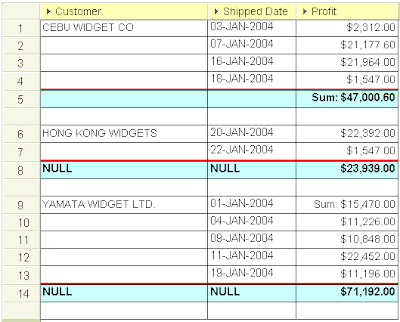
After I clicked the OK button in the above box, Discoverer redrew my screen, but drew it incorrectly as shown below in illustration 3. As you can see, the totals still calculate correctly. But take a close look at what happened on the totals line for each sub-total other than the first one. As you can see, the word NULL has been inserted against each of the other items. In addition, take a very close look at row 9 and in particular at the cell value containing the Profit. As you will see, Discoverer has placed the Sum label here instead of alongside the $23,939.00 on the previous row.

It therefore appears that the insertion of an additional line for the group sort has caused the label to move down by that number of rows also. This means that Discoverer does not know what to do with the cell values on the original sub-total and so it inserted a NULL value. Formatting the table to change the display of NULL values to something other than NULL does indeed change the wording.

Illustration 3: A group sort with the sub-total displayed incorrectly

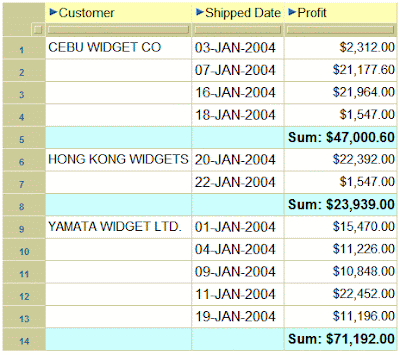
Therefore, please be very careful when using additional lines between group sorted items when there are sub-totals. The following illustration shows the same worksheet displayed in Viewer. As you can see below in illustration 4, Viewer does not appear to have this issue. I can therefore only assume it is something to do with the Java.

Illustration 4: The same group sort, as seen in Viewer, with the sub-total displayed correctly

Friday, April 13, 2007

The future for Discoverer

From time to time people approach me and ask me what do I think will happen to Discoverer now that Oracle have Siebel and Hyperion (including Brio). The pessimists in the world think that Oracle plan to drop Discoverer. I don't believe this for one minute.

But why don't I believe this? Well for a start Oracle have new releases of Discoverer planned for this year (10.1.2.3), and next (11g). However, for fun, let's assume that Oracle do plan to drop Discoverer. They won't announce this in the same year that they release 11g because that would just make folks not even bother to use the latest version. So the earliest I would see such an announcement would have be in 2008. However, as all Oracle products carry a 5 year full support agreement from whenever the drop is announced this would mean that Discoverer would remain a fully supported, patchable, fixable product until at least 2013. That's a lifetime in terms of software. That's 6 years from now. Oracle will have bought SAP by then. Maybe even the San Francisco Giants will have managed to win a game against the Padres!

However, the real reason I don't believe Oracle will drop Discoverer is because of some very favorable comments coming out of Oracle.

Firstly, Oracle has recently revamped its Standard Edition page on oracle.com (link) which makes for very interesting reading.

Secondly, follow the link for the data sheet (link) and you will get to a PDF document that outlines just where Discoverer fits into the Fusion picture. With acknowledgements to Oracle, here are some interesting snippits from that document:

You've already chosen Oracle database for your business, now make it shine by complementing it with the business intelligence suite that is most tightly integrated with it - Oracle BI Standard Edition.

Oracle BI Discoverer is [tightly] integrated with other components of Oracle Fusion Middleware.

Discoverer reports are easily embedded within Oracle Portal using a simple wizard, making role-based dashboard creation a simple exercise.

Oracle Discoverer is also unique in that it recognizes and respects the Oracle E-Business Suite security model.

Today few of us buy best of breed kit parts and hand craft our own cars; most of us simply go to an established, proven manufacturer to obtain a complete solution, backed by a warranty with a single support organization should anything happen. Software should be like this - and this is where Oracle BI SE delivers. Everything - from ETL (with Oracle Warehouse Builder), to ad-hoc query (with Oracle BI Discoverer), to dashboards (with Oracle Portal), to pixel-perfect reporting (with Oracle XML Publisher), to custom BI development (with Oracle BI Beans) - is available as an integrated set of components.

The entire middleware solution can be effectively clustered with low cost hardware. Combine this deployment flexibility with an attractive pricing model for BI and middleware components, and you will be hard pressed to find a more affordable fit for your growing BI needs.

There - I could not have said it better. I think this clearly shows Oracle's intentions.

Wednesday, April 11, 2007

Looking for a great Discoverer position

If you are an experienced Discoverer developer and are looking for a great position and opportunity in Washington, DC, then we may have the job for you. Click here for more details.

Monday, April 09, 2007

Workbook Migration Document

By popular request I have made my Workbook Migration white paper available for free download on my website. You will find it at this link.

It now joins these other white papers available for download:
  • Discoverer libraries - a concept
  • Setting up an Apps mode EUL
  • Multiple Oracle Homes

Thursday, March 29, 2007

InfoCaptor

I am delighted to be able to announce that Armstrong-Smith Consulting has partnered (link) with InfoCaptor to bring you access to a superb dashboard tool that can revolutionize the way you see your Discoverer metadata. I have been using it in-house for a while now and can endorse this tool's ability to make your Discoverer metadata available to a wider audience in a format that you'll love.

With InfoCaptor you have the ability to generate CSV, Excel, HTML and PDF output of your data. You will love this tool - and it's affordable too. For an HTML example of the output from our own database, scroll down or click here.

To purchase or to find out more information, click here.

What can you do with InfoCaptor?
  • Drop your SQL query in the editor, then quickly create tables and charts
  • Link up related portlets (tables, charts) using drills
  • Define parameters and wire up all of your portlets
  • Generate documentation for your database in PDF, HTML, Excel
  • Generate Lineage documentation for your Data Warehouse and BI environment
  • Create briefing books from your dashboard contents, suitable for distributing and presentations
  • Create quick Dashboard prototypes, no server installation needed
Example Output:

Discoverer 3.1 licenses

Whether Oracle chooses to accept it or not there are lots of organizations who are still using Discoverer 3.1 and, at least for now, have no intention of upgrading. These organizations all bought legal copies of the software and have done nothing wrong. However, I was amazed to hear that Oracle is refusing to take new revenue from those organizations in an attempt to force them to upgrade.

I was contacted today by one such organization who wanted to purchase additional Desktop licenses for 3.1. When they contacted Oracle they were told that because Oracle no longer sells 3.1 they cannot purchase those additional licenses. They're not asking for new software, they're not asking for support, all they want is to add extra users to their system. Remember that Desktop is priced at $1,000 per named user. This makes me wonder how much revenue Oracle has turned away in the past couple of years since 3.1 went out of support.

Anyway, Oracle's loss of revenue is not the issue in this posting. My dilemma is the advice that I should give to the organization that contacted me? Seeing as Oracle seem to be washing their hands of 3.1, does this give the organization the green light to go ahead and keep adding the extra users until they are ready to upgrade? Do I tell them that they must hurt their own business by only using the licenses they have already purchased? Do I tell them that they must upgrade? Seeing as Desktop has hardly changed since 3.1 and the cost of the license is identical I don't see any reason to force them to upgrade when they are not using Plus. What do you think?

Wednesday, March 28, 2007

Discoverer 10g Handbook Review

The December edition of the ODTUG (link) technical journal published a review of our Discoverer 10g Handbook.

Written by Karen Cannell from the Integra Technology Consulting Corporation a copy of this review can be read on our website (link), or if you are a full member of ODTUG you can download a copy of the review by following this link.

Tuesday, March 27, 2007

Freeing up disk space on XP

If you're like me and have a laptop with XP you'll know that you don't have a huge hard disk. Thus, keeping that disk space down to the minimum is essential.

Windows XP’s System Restore is a great way to recoverer your system after you’ve made a configuration change or installed new software that your computer doesn’t quite see eye to eye with.

Did you know that every 24 hours, or when you make a change to your system, XP will create a new restore point? Did you also know that these stored restore points can use up to 12% of your hard disk space?

Therefore, should you find that you have a need to free up some of that valuable disk space, what can you do? Well one thing you can do is to delete all but the most recent restore point - providing of course that you are happy with the current setup. To do this you need to use Microsoft's Disk Cleanup utility.

Use the following workflow:
  1. From the Start button, navigate to Programs Accessories System Tools Disk Cleanup
  2. On the Disk Cleanup tab, check or uncheck the files to delete, then click the OK button. I usually allow the system to clear out Downloaded Program Files, Temporary Internet Files, Microsoft Error Reporting Temporary Files, Recycle Bin and Temporary Offline Files
  3. Click the More Options tab
  4. In the System Restore area, click the Clean up button
  5. You will be asked to confirm that you want to delete all but the most recent Restore Point. If you are sure you want to do so, click the Yes button

Thursday, March 22, 2007

Memories of Summit 2007

For the past week, my wife and president of Armstrong-Smith Consulting, Darlene, and I, along with 3 other members of our highly experiended team, Dale Jones, Byron Smith and Stephanie Smith, have been in Las Vegas attending the SunGard Summit 2007 (link) conference. At the conference we had a 10 x 10 booth and discussed our Oracle Discoverer training and consultancy offerings with hundreds of attendees. All in all we had over 500 people attend our booth. During the conference we also gave away an iPod and 4 copies of our Oracle Discoverer 10g Handbook (link).

On Tuesday between 11:30 am and 12:30pm in the South Seas ballroom of the Mandalay Bay Convention Center (link) I presented a paper called A look at the powerful features of Discoverer 10g. This was well received and I am so pleased that so many people came to see me. During the conference I was also able to put a face to many of the SunGard staff whom we have been conversing with during recent months. Don't you think the world is just full of charming people?

For those of you who don't know, SunGard Higher Education (link) provides software, systems implementation and integration, strategic consulting, and technology management services to colleges and universities. Here at Armstrong-Smith Consulting we are delighted to have partnered with SunGard and to be a part of the SunGard Higher Education Collaborative (link). Our partnership allows us to provide report building, training and other consultancy services for Oracle Discoverer on the SunGard ODS and EDW products. We can even help institutions comply with federal and state regulations to ensure that their private data is secured.

Are you a SunGard Higher Education customer?

Do you have the SunGard ODS or EDW?

Do you have Oracle Discoverer?

If you answered yes to the above three questions you need to speak with either your SunGard Higher Education support representative or email us at info@learndiscoverer.com and find out how we can help you make the most of your investment.

Saturday, March 17, 2007

Discoverer and IE7

It seems Oracle have released a patch (5758865) , available on MetaLink, with the fix for IE7. This is a one-off patch and requires a password which means you will have to raise a service request and tell Oracle you are having trouble drilling in Viewer when using IE7. This patch is applicable whether you are using relational or OLAP modeling.

The downside of this patch is that it can only be applied on top of 10.1.2.2. You can get the 10.1.2.2 patch (4960210) also on MetaLink. Be warned though that 10.1.2.2 is not a small patch. It is 1.6 GB in size and is a full upgrade of the 10.1.2.0.2 application server.

Has any body applied the 10.1.2.2 patch yet? I'd be interested in hearing how it went and how long it took. I ask because the installation instructions, when downloaded in Word, are a staggering 189 pages.

New Blog with Discoverer content

I cam across another blog with postings about Discoverer. This one is run by Senthil Rajendran (link) who works in Oracle's OnDemand Operations. He has posted several interesting postings on Discoverer recently. This is a blog I will be following.

Some recent postings:

Installing Discoverer Administration Edition on Windows PC (link)

Upgrading the existing Discoverer End User Layer to Discoverer 10.1.2 (link)

Follow this link for the best of Senthil's Discoverer postings.

Saturday, March 10, 2007

Mark Rittman's new company

Mark Rittman and a colleague, Jon Mead, have started a new venture called Rittman Mead Consulting. Their aim is to become the No 1 supplier for high end business intelligence architecture, design and training resources in the Oracle market. I have known Mark for several years and I know he is an expert in this area and wish him and Jon all the very best for their new and exciting venture. I know they will be a success.

Because Mark has moved companies please note that his blog has moved also. You will now find his blog here: http://www.rittmanmead.com/blog

Wednesday, March 07, 2007

Is your PC ready for Daylight Savings Time change?

Unless you have been living on a desert island for the last few months you will be aware that this coming weekend the US implements a change to Daylight Savings Time.

Are you ready for the upcoming change to Daylight Savings Time?

If you are working on a network and your company has a centralized update mechanism for your PCs you are probably ok. However, if you have a laptop or work from home or work in a company that doesn't have a centralized update policy you may want to check that your PC knows about the changes.

Microsoft has issued a web page (link) that you can use to check your computer. If you haven't got automatic updates enabled you will want to follow this link and get your computer updated. Only verified users of Microsoft Windows can use this service so if you have an illegal copy, which you shouldn't tsk tsk, you won't be able to run the update.

Having verified that your computer is ok the link will then ask you if you use Outlook. If you are using Outlook and you are using the Calendar and you have meetings or appointments scheduled during the next four weeks, you need to download and run a further update. The updater web page will walk you through this.

By the way, if you are using XP Service Pack 2, the Microsoft patch number for ensuring that your PC has been updated for Daylight Savings Time is KB931836. You can use the Control Panel Add or Remove Programs to check if this has been installed. Scroll to the bottom of the list and look at the last few Security Updates. If the update has already been installed you won't need to run it again (the updater checks) but you will still need to update Outlook if you are using it.

If you are absolutely certain that your PCs operating system has been updated, you can just check Outlook (link).

Tuesday, February 27, 2007

Need to upgrade Java for U.S. Daylight Saving Time Changes

Background

On the Sun Java website (link) is the following posting:

Daylight Saving Time (DST) is a system of handling the changing amounts of daylight throughout the year. The goal of DST is to maximize the daylight hours available during typical waking hours. By adjusting clocks ahead a standard amount, usually an hour, people can have more daylight available during their typical work day. For example, suppose you wake daily at 7:00 AM. In the spring, the sun rises earlier each day. Instead of waking up at 6:00 AM to take advantage of the daylight, DST observers move their clocks ahead an hour. The effect is that they can continue to wake at 7:00 AM according to the clock and enjoy more daylight. In the fall, people set their clocks back an hour as sunrise happens later each day.

The United States has planned a change to its DST observance beginning in 2007. The Energy Policy Act of 2005 mandates that DST will start on the second Sunday in March and end on the first Sunday in November. In 2007, the start and stop dates will be March 11 and November 4, respectively. These dates are different from previous DST start and stop dates. In 2006, the dates were the first Sunday in April (April 2, 2006) and the last Sunday in October (October 29, 2006).

The Java Runtime Environment (JRE) stores rules about DST observance all around the globe. Older JREs will have outdated rules that will be superseded by the Energy Policy Act of 2005. As a result, applications running on an older JRE may report incorrect time from March 11, 2007 through April 2, 2007 and from October 29, 2007 through November 4, 2007.

If you are concerned about application failures that may result from these DST changes, you should update your Java Runtime Environment. If you have 1.4.2_05 or 1.4.2_06, which many of you with Discoverer will have, then you should upgrade your clients to 1.4.2_13 by downloading it from the Sun website. If you are unable to download the update, Sun has provided a utility that will upgrade the timezone elements of your current install.

Note: The latest information I have is that there is no need to upgrade the Java on the server.

Download and install 1.4.2_13
To remove the Sun JRE 1.4.2_xx and re-install the correct version, use this workflow:

  1. Download the Sun JRE 1.4.2_13 from the Sun website. It can be found here:http://java.sun.com/j2se/1.4.2/download.html
  2. On this page, look for and click on the Download J2SE JRE link.
  3. On the next page, you are required to read and accept the license agreement.
  4. After checking the box labeled "Accept License Agreement", download the software labeled "Windows Offline Installation, Multi-Language". This file is about 15Mb in size *.
  5. Either you or one of your IT staff should now connect to your machine as a local administrator and install the software. Just follow the onscreen prompts.
  6. When done, you will need to restart the computer. When the system reboots, you will need to disable the automatic upgrade mechanism ** by following the remainder of these steps.
  7. From the Windows Start menu, select Settings > Control Panel.
  8. Double-click the icon for the Java ™ Control Page. It is usually named either Java or Java Plug-in.
  9. When the Java Control Panel opens, click the Update tab.
  10. Uncheck the box labeled "Check for updates automatically".
  11. Click the OK button to save and exit.

* The file that is downloaded is an executable called: jr2e-1_4_2_13-windows-i586-p.exe.
** Even though you may have already told the previous version not to automatically upgrade, when you install 1.4.2_13 this will have been reset.

Download and run the updater script
There is a tool on the Sun Java website (link) that you can download to upgrade the time zone data for your Java. To get this tool you will need to be registered for support with Sun. This is a very easy process. If you have not registered for support with Sun you will find a link called Register Now on the page (link).

To download and run the updater script, use this workflow:

  1. On the Sun Java(TM) 2 SDK, Standard Edition - US DST Timezone Tool 1.0.1 page, click the link for the download and save the file (tzupdater-1.0_1.zip) in a safe place on your system.
  2. Unzip the file. It will create a folder called tzupdater2007a
  3. Launch a Windows command prompt session
  4. Navigate to the folder called tzupdater2007a
  5. Execute this command: java -tar tzupdater.jar -t


Some Daylight Saving Time Links:

About Daylight Saving Time

When does Daylight Saving Time begin and end

Tuesday, February 13, 2007

What would you like to see?

Hi everyone
Is there anything about Discoverer that has been bugging you, something where a posting might help? Perhaps you have a desire to know how to do something, or perhaps you would like to see a visual aid for working through a workflow?

Drop me a line to michael@learndiscoverer.com and I will see what I can do.

Sunday, January 21, 2007

ODTUG 2007 Presentations

Hello everyone. Just wanted to let you know that I have had two papers accepted for this year's ODTUG Kaleidoscope conference in Daytona Beach, Florida.

The two papers are entitled:
  • Securing private information
  • Automated scheduling and e-mailing from within Discoverer

Securing private information

Recent high-profile cases have highlighted the need for data such as social security numbers, dates of birth and ethnicity to be protected.

Have you considered securing your private and confidential information but decided it was too difficult?

If so, come to ODTUG in June and let me show you how to use the database to secure your organization's information. Using profiles and a VPD, you will see how to set up both row-based and column-based security. I will of course use Discoverer to demonstrate how the data has been protected.

The second part of the presentation will show you how you to set up a mechanism to allow your support staff to connect to the database using the same profile as an end user, without the need to know the end user's password. This will also be demonstrated using Discoverer.

Thus, you can set up a secure environment yet at the same time enable your support staff to help your users without the security breach of a disclosed password.

Automated scheduling and e-mailing from within Discoverer

As a regular contributor to Oracle OTN forums I am frequently asked how to do this and how to do that. Many of the answers that I give relate to the advanced use of Discoverer in ways that it was not designed to do in it's standard mode.

One of the most frequently asked questions that comes up is how to automate the scheduling and emailing of Discoverer reports. Using a combination of powerpoint and a live demonstration, I will show attendees just how to use the Discoverer command-line interface in conjunction with a third-party scheduler and third-party command-line email tool to do exactly this.

The second half of my presentation will be a live demonstration of how to set up Discoverer to allow the creation of lists of values that comprise both an ID and a Description at the same time. The live demonstration will use a combination of both Discoverer Administrator and Discoverer Plus to show parameters that will accept either an ID or Description, yet still returning the description to the user.

Summary

Both of these presentations will be in my usual style yet will cover a couple of really complex issues that have constantly been asked for on the forums.

By providing attendees with these practical hints and tips, I am hopeful that attendees will come away with a better understanding of the power of Discoverer.

Being a member of Oracle's business intelligence customer advisory board, the author of the Oracle Discoverer 10g Handbook, and an Oracle ACE, I probably know Discoverer better than most. Who better, therefore, to show you how to make the most of the amazing product that is Oracle Discoverer?

Tuesday, December 19, 2006

A funny thing happened the other day

About six weeks ago I purchased a new REV backup kit from Iomega. We had never had a hard drive crash but I thought - hmm - well it's better to be safe than sorry. We installed it and I distinctly remember it taking many hours to accomplish a complete backup of our application server. Great, great, great - and off to bed I went with a smile.

Well, would you believe it? One week went by and that same server suffered a hard drive failure. Wow - how lucky we have a backup my engineer told me. Not so.....

After purchasing a new hard drive and inserting it into the machine the Iomega software was unable to read their own backup device. Well no problem, my hardware engineer told me, let's give their technical support a call. You could have knocked me down with a feather when they questioned why we had used their software. We're not surprised you can't use the backup if you used our software - you should have used someone else's. Thinking my engineer had misheard I asked him to verify and sure enough the same comment was repeated.

So another call to the Iomega technical support followed, suitably escalated to someone who was a bit more responsible and didn't make flippant remarks about their software. This time we were told to send the tape to them and they would see what they could do. We readily agreed and bundled a new hard drive with it thinking that in a few days we would have our data.

Upon receiving our REV drive, here is what they said:

Our evaluation at this point has concluded that the problem appears to be that the REV disks are unstable with potential read errors that may have resulted in file structure damage and/or corruption which may adversely affect some data segments.

Upon stabilizing the set, we will have to manually extract the data to a native file system, rebuild the corrupted / invalid file system components and tables, adjust file pointers and mount the recovered volume(s) and finally determine if some or all of the data you require is intact.

Based upon this initial evaluation, we feel that a recovery may be possible.

Wonderful, we said and asked When might we expect to see the data?

Oh no, sir, this service is not free. If you want us to give you your data it will cost you $1,700 plus tax.

Of course we said - you're joking right? It's your machine, we just bought the thing, we use your software, it's under warranty, it reported no errors, stop kidding and send us the data.

Unfortunately, they were deadly serious.

Please understand that I'm not casting any aspersions on Iomage or their products. They have a great reputation for great products, I even have one of their external drives. I'm only stating what happened to me and how puzzled I am by what has happened. I honestly thought a warranty was a warranty. Well next time I will read the small print and put this one down to experience.

I thought about it later and reflected what my customers would say to me if I sold them a piece of software that didn't work and then said it will cost you more money to have me come in and fix it - oh and by the way the fee will be double what it cost you to buy it two weeks ago. Guess how many customers I would have!

In case you were wondering, we never did continue the discussions with Iomega. We purchased a new server, this time with RAID technology and triple mirrored drives. So this weekend, Christmas weekend, I get to go home and install OBI.

Happy Christmas everone.

Monday, December 18, 2006

When did those reports last run?

Here's an interesting piece of code that I developed recently that you may find to be of use. It is aimed at administrators and uses a combination of the statistics (EUL5_QPP_STATS) and the documents (EUL5_DOCUMENTS) EUL tables to determine whether a workbook that has been saved to the database has been run recently.

SQL Code:

SELECT DISTINCT
DOCS.DOC_CREATED_BY DOC_OWNER,
DOCS.DOC_NAME DOC_NAME,
(SELECT TRUNC(MAX(DM.QS_CREATED_DATE))
FROM EUL5_QPP_STATS DM
WHERE DM.QS_DOC_NAME = STATS.QS_DOC_NAME) LAST_RUN
FROM
EUL5_QPP_STATS STATS,
EUL5_DOCUMENTS DOCS
WHERE
DOCS.DOC_NAME NOT LIKE 'Workbook%' AND
STATS.QS_CREATED_DATE(+) > :CUTOFF AND
DOCS.DOC_CREATED_DATE < :CUTOFF AND
DOCS.DOC_NAME = STATS.QS_DOC_NAME(+)
HAVING :RUN_DATE >=
NVL((SELECT TRUNC(MAX(DM.QS_CREATED_DATE))
FROM EUL5_QPP_STATS DM
WHERE DM.QS_DOC_NAME = STATS.QS_DOC_NAME),'01-JAN-2000')
GROUP BY DOCS.DOC_CREATED_BY, DOCS.DOC_NAME, STATS.QS_DOC_NAME
ORDER BY LAST_RUN DESC, DOCS.DOC_CREATED_BY, DOCS.DOC_NAME;


Note: The DOCS.DOC_NAME NOT LIKE 'Workbook%' code omits workbooks that were saved using the generic name that Discoverer always users. You might want to find these later and discuss removing them with your users!

Code explanation
The above code has a number of facets about it that I think I ought to explain a little more in depth. These are:
  • The reason for the DISTINCT is to make sure that if the workbook was run more than once during a day that it is not counted twice.

  • The :CUTOFF parameter prompts for a date. Whatever date is entered here is used to find workbooks that have been saved to the database prior to that date and have either run since that date or never run at all

  • The :RUN_DATE parameter prompts for a date also. It is used to find workbooks that have not been run after this date.

  • The following code is interesting because it finds both workbooks that have been run and those which have never run, returning NULL if the workbook did not run at all in the period between the two parameters

HAVING :RUN_DATE >=
NVL((
SELECT TRUNC(MAX(DM.QS_CREATED_DATE))
FROM EUL5_QPP_STATS DM
WHERE DM.QS_DOC_NAME = STATS.QS_DOC_NAME),'01-JAN-2000')

Sample Output
Here's some sample output, from TOAD, that I ran this evening against my own test database using 01-JUN-2006 for :CUTOFF and 01-SEP-2006 for :RUN_DATE.


Note: If you have never used TOAD or have always wanted to try it but never got around to it please let me know by email at michael@learndiscoverer.com. I have partnered with the manufacturer and have a trial license which you can use for evaluation purposes.

Thursday, December 14, 2006

Creating indexed items

I saw this recent posting on the OTN forums:

Is it possible to create Discoverer LOV's to display a lookup description e.g. Department Name and return the primary key code namely, Department Id when using an LOV for parameters for example?

The answer is Yes but the solution needs a bit of explaining so I thought I would do so here so that it is available to everyone. In order to make this happen we need to have a table that has an item and a code, and make sure that there is a one to one relationship between the item and the code. It's better to do this against a dimension table that contains unique codes and items. Then, you also need to make sure that there are indexes on both items.

Example table:

Let's start with creating the new table, inserting some values into it, and creating a couple of indexes. Here's the code:

CREATE TABLE TST_TABLE AS (
SELECT 1 PERSON_UID,
Trunc(SYSDATE) BIRTH_DATE,
TO_CHAR(TRUNC(SYSDATE), 'DD-MON-YYYY') CHAR_DATE,
123456 TAX_ID,
'Smith, Michael' FULL_NAME
FROM dual);


INSERT INTO TST_TABLE VALUES (
2, TRUNC(SYSDATE),
TO_CHAR(TRUNC(SYSDATE),
'DD-MON-YYYY'), 234456,
'Jones, Edward');

INSERT INTO TST_TABLE VALUES (
3, TRUNC(SYSDATE),
TO_CHAR(TRUNC(SYSDATE),
'DD-MON-YYYY'),
434456, 'Evans, Bob');

COMMIT;

GRANT SELECT ON TST_TABLE TO PUBLIC;

CREATE INDEX TST_TABLE_UK1 ON TST_TABLE (PERSON_UID);

CREATE INDEX TST_TABLE_UK2 ON TST_TABLE (FULL_NAME);

Discoverer Administrator steps
Next, I went into Discoverer Administrator and imported the table as a new folder from the database. I then went to the Full Name and created a standard list of values on it. With that done, I right-clicked on the item and from the pop-up list selected Properties. Scrolling down to the bottom of the list is a property called Indexed Item. Clicking this brings up a small dialog box in where I picked the indexed item called PERSON_UID.

Note: Indexed Item only becomes accessible when there is a) a list of values on the item, b) that there is another item in the same underlying table that is also indexed, and c) that there is a one to one relationship between the two items.

When I clicked OK, Discoverer displayed the following message:

There is nothing else to do except to click OK and allow Discoverer to create the other list of values. With this done, I am finished with Discoverer Administrator.

Working with Discoverer Plus
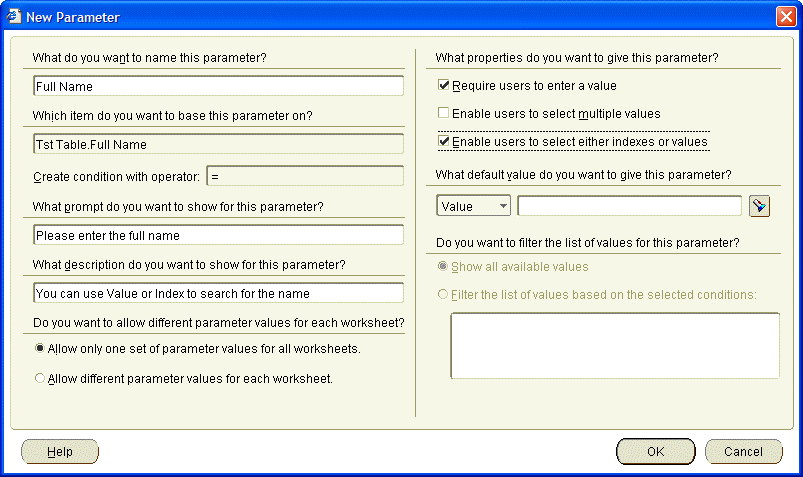
I created a new worksheet that includes the original item, FULL NAME, that we worked on above. Next, I created a new condition for the item but opted to use a parameter for the operand. On the right-hand side of the New Parameter dialog box, as shown below, is a checkbox called Enable users to select either indexes or values. I checked this box, completed the parameter and condition.

Note: the Enable users to select either indexes or values will be grayed out if the administrator has not completed the Discoverer Administrator steps outlines earlier.

When I execute this worksheet, it pops up the following parameter. As you can see this parameter is different to those that are normally seen inside Discoverer because this one has an additional drop-down box.

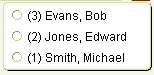
Clicking on the flashlight for the list of values, Discoverer displayed the following list. As you can see, it has both the value and the index, with the index being displayed in brackets.

Note: the above list is displayed no matter whether the user selects Index or Value in the first drop-down. The difference is only seen when the user completes the selection.

The following illustration shows what is returned when I searched by index and selected (2) Jones, Edward.

The following illustration shows what is returned when I searched by value and selected the same person.

The following illustration shows the output of my worksheet when I complete the parameter selection. It makes no difference whether I select by index or by value because the worksheet still displays the value as originally requested.

I hope this helps show how indexed items works.

Note: Do not attempt any of this inside Discoverer Desktop because it will not work. However, if you create a worksheet that has a parameter that uses Index and Value that parameter will be available inside Discoverer Viewer.

VPD date issue between 10.1 and 10.2 databases

I have uncovered an issue today with VPD against date fields. The issue came up at a client site on a 10.2 database. When I got back to the hotel and tried this on my own database, which is 10.1, I got no issue and everything worked ok.

Therefore, I am asking if anyone is able to try out the following for me on different Oracle databases and platforms and let me know by email at michael@learndiscoverer.com whether it worked for you or not. I'd like to compile a list of database versions and platforms on which the issue occurs.

Step 1: create this table as a user

CREATE TABLE TST_DATE AS (
SELECT 1 PERSON_UID,
Trunc(SYSDATE) BIRTH_DATE,
To_Char(Trunc(SYSDATE), 'DD-MON-YYYY') CHAR_DATE,
123456 TAX_ID,
'Smith, Michael B.' FULL_NAME FROM dual);

Step 2: grant select rights on the table

GRANT SELECT ON TST_DATE TO PUBLIC;

Step 3: switch your login to SYS and run this script:

CREATE OR REPLACE FUNCTION F_CHECK_ITEM_TST(p_object_schema in varchar2, p_object_name varchar2)
RETURN VARCHAR2 IS
V_PREDICATE VARCHAR2(2000) := '1 = 2';
BEGIN

RETURN(V_PREDICATE);
END F_CHECK_ITEM_TST;

Step 4: Run this to grant access rights over the function

GRANT EXECUTE ON F_CHECK_ITEM_TST TO PUBLIC;

Step 5: Run this to enable the policy

BEGIN DBMS_RLS.ADD_POLICY(
OBJECT_SCHEMA => 'DRAKE',
OBJECT_NAME => 'TST_DATE',
POLICY_NAME => 'SecByTST',
FUNCTION_SCHEMA => 'SYS',
POLICY_FUNCTION => 'F_CHECK_ITEM_TST',
STATEMENT_TYPES => 'SELECT',
POLICY_TYPE => DBMS_RLS.DYNAMIC,
SEC_RELEVANT_COLS => 'BIRTH_DATE',
SEC_RELEVANT_COLS_OPT => DBMS_RLS.ALL_ROWS);
END;

Note: in the above policy change the OBJECT_SCHEMA name to be the name of the user who owns the table you created in Step 1

Step 6: Go into Discoverer Admin and import the table as a new folder.
Be sure to uncheck the "Date hierarchies" box and set "Default aggregate on data points" to detail. Grant access to any user.

Step 7: Using Desktop or Plus, log in as that user then try to query the folder with the date not included, there should be no problem.

Step 8: Now try to query with the date included
On my 10.2 database I get ORA-24334: no descriptor for this position. This happens when logged into Discoverer as the table owner, EUL owner or any other user. However, when logged into Discoverer as SYS which is exempt from all VPD policies, there is no error when the date is included.

We tried this in Discoverer Desktop, Plus and Viewer with the same results in all three. We can successfully query the table from SQL*Plus, SQL Developer and TOAD.

There also seems to be no issue at all with the 10.1 database so there seems to be an issue between Discoverer and the 10.2 database.

What do you think?

P.S. to cancel the policy use this script when logged in as SYS:

EXEC DBMS_RLS.drop_policy(
OBJECT_SCHEMA => 'DRAKE',
OBJECT_NAME => 'TST_DATE',
POLICY_NAME => 'SecByTST');

Wednesday, December 13, 2006

A Discussion about Averages

Overview
Many people think that the term “mean” means the same thing as “average.” It doesn't. The term mean is a mathematical term, whereas the term average is often used loosely as a description for a person or a data item. In mathematics, average is a number that typifies a set of numbers of which it is a function.

In other words, average can stand for mean, median, or mode. So what is the difference between these three terms?

  • Median - is the middle value in a set of numbers; above and below which lie an equal number of other values.
  • Mean - is a number that typifies a set of numbers, such as a geometric or arithmetic mean; it is what most people think of as being the average value of a set of numbers.
  • Mode - is the value or item that occurs most frequently in a set of statistical data.
Look at the following two sets of data:

Example set 1: 15 16 17 17 17 18 19
Analyzing this first set of data, representing the ages of the seven students in a school who enjoy drama, I get:
  • Mean Age = 17
  • Median Age = 17
  • Modal Age = 17
Example set 2: 15 17 17 17 21 29 52
Analyzing this second set of data, representing the ages of the seven night school students who enjoy drama, I get:
  • Mean Age = 24
  • Median Age = 17
  • Modal Age = 17
As you can see, the median age and the modal age for both sets of students are the same, whereas the mean age is completely different. Which average you choose will determine whether you consider the average age for students who enjoy drama to be the same for both normal schools and night schools. If statistics (mathematics is my major by the way) taught me nothing else, they showed me that there is no such thing as an average.

So let's move on to Discoverer and let me show you how to create the calculations that will enable you to report the Median and the Mode. I won't discuss Mean here because this is what Discoverer and everyone else generally refers to as the Average. As you know, Discoverer has a built-in function (AVG) to handle this.

The base worksheet:
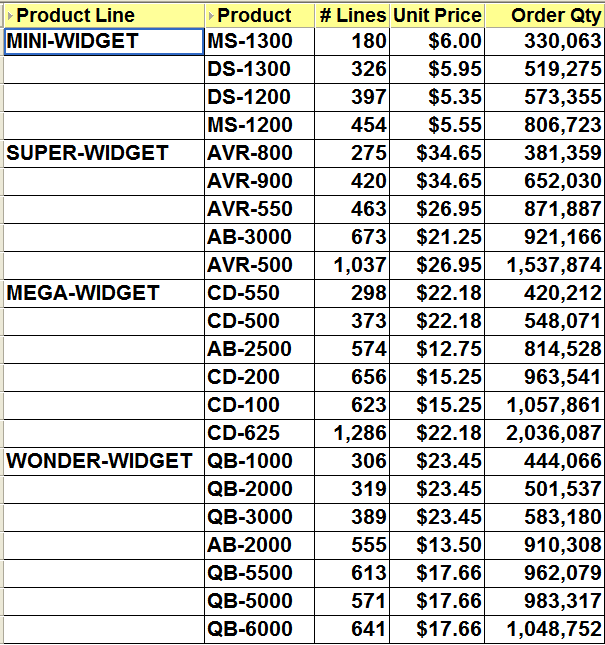
As usual, I will start with a base query drawn from my own tutorial database. As you can see below, this worksheet displays a count of the number of lines, the unit price and the total number ordered for each product against each product line. There is a group sort on the Product Line and a low to high sort on the Order Qty.
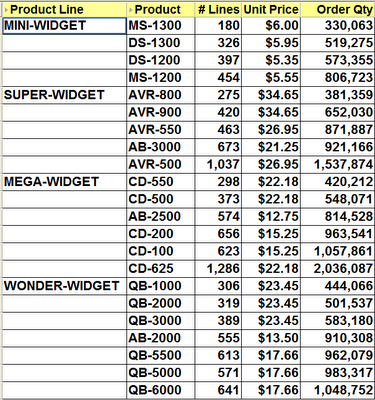

Creating the Median

The calculation that you will need for the Median is the PERCENTILE_CONT analytic function. The basic syntax of this function is:

PERCENTILE_CONT(n) WITHIN GROUP(ORDER BY expr1)
OVER(PARTITION BY expr2)

Looking at my base query above let's figure out some values for expr1 and expr2, then I will discuss the appropriate values for n.

First of all, the easy one - the PARTITION BY. Looking at the example worksheet above I can see that I have a group sort on the Product Line. Because I know that page items and group sorted items are normally the partitioned items I will use the Product Line for expr2.

Next, let's determine a value for expr1 - the ORDER BY. Once again, look at the example worksheet. I only have two sorts in my worksheet. The first is a group sort on the Product Line and the second a low to high sort on the Order Qty. However, my Product Line has already been handled because it is my partitioned item. Therefore, the most logical item for me to use in my ORDER BY clause is the Order Qty, which is what I did.

Note: the underlying aggregation for my Order Qty is SUM so it is very imported to select the Order Qty SUM and not Order Qty itself.

Finally, let's discuss n - the value provided to PERCENTILE_CONT. This is a value from 0 to 1 with the value indicating how far along a scale from 0% to 100% I want the value to be. Because the definition of Median is the midle value, it therefore makes sense to choose 0.5 or 50%.

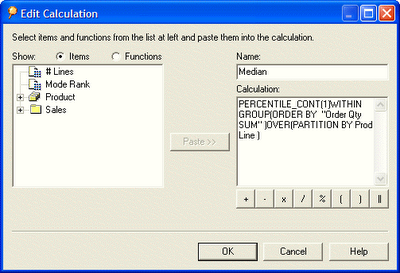
Putting all of this together, here is my calculation:

PERCENTILE_CONT(0.5) WITHIN GROUP(ORDER BY Order Qty SUM)
OVER(PARTITION BY Prod Line)

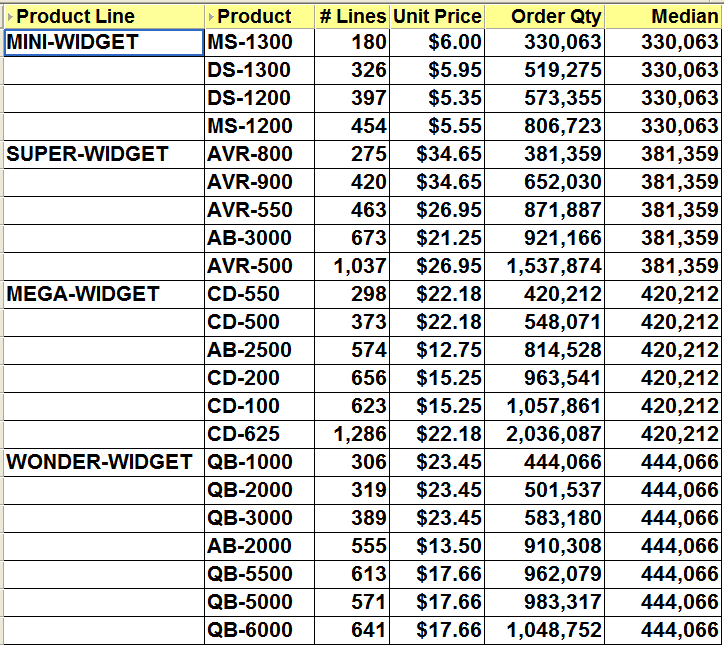
which when inserted into a Discoverer calculation makes my worksheet look like this:
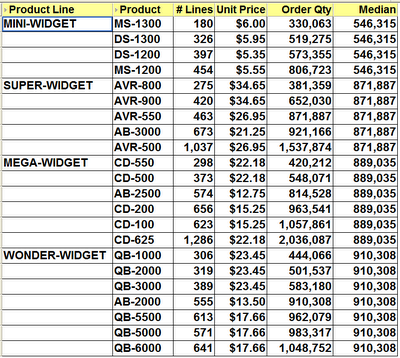
Note: because there are an even number of values for MINI-WIDGET and MEGA-WIDGET, Discoverer will choose a value exactly half-way between the two middle items in the set. When there is an odd number of values, Discoverer will always choose the actual middle item, as you can see if you look at the Median for SUPER-WIDGET and WONDER-WIDGET.

Using 0 and 1 in PERCENTILE_CONT

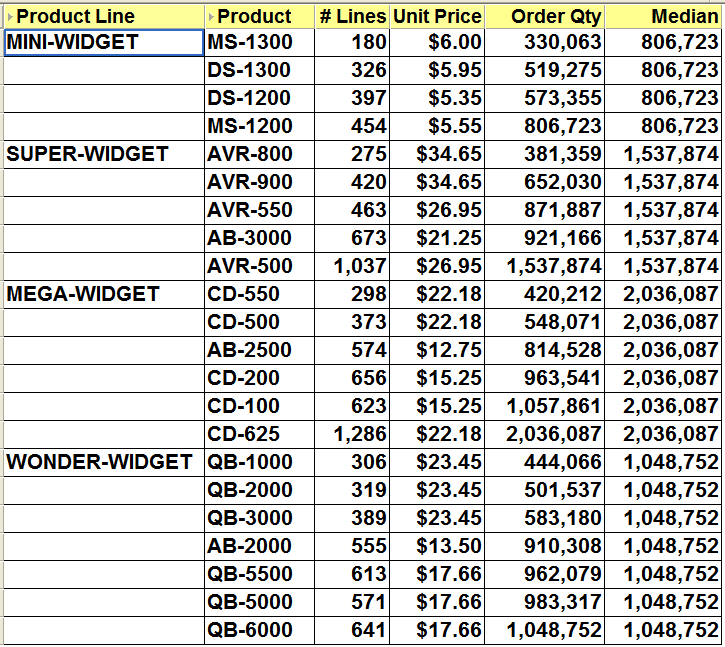
If you use 0, for 0%, as the value for n in the PERCENTILE_CONT calculation this means you want Discoverer to display the first value, wheras if you use 1, for 100%, this means you want to see the last value.

Here is an example using 0:

PERCENTILE_CONT(0) WITHIN GROUP(ORDER BY Order Qty SUM)
OVER(PARTITION BY Prod Line)
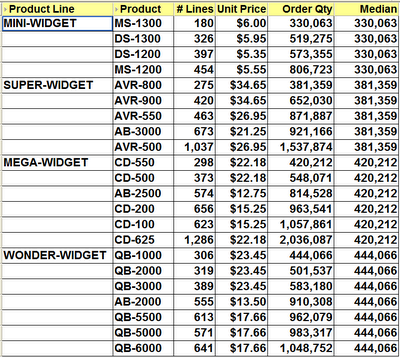
Here is an example using 1:

PERCENTILE_CONT(1) WITHIN GROUP(ORDER BY Order Qty SUM)
OVER(PARTITION BY Prod Line)
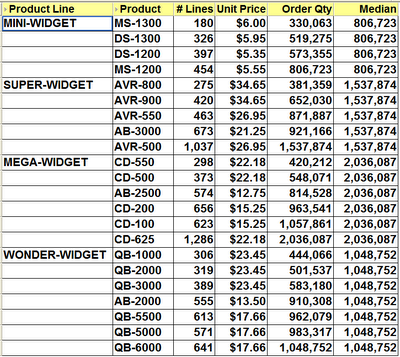
Here is what this last calculation looks like inside Desktop:
Creating the Mode

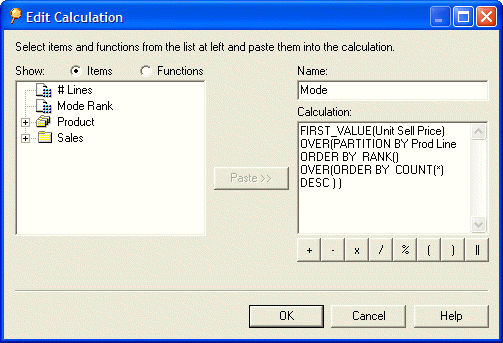
The calculation that you will need for the Median is the FIRST_VALUE analytic function, couple with the RANK function. The basic syntax of this combined function is:

FIRST_VALUE(expr1) OVER(PARTITION BY expr2
ORDER BY RANK() OVER (ORDER BY COUNT(*) DESC))

Hopefully, you can see what is going on. Starting from the inner function, the RANK, all this does is count the number of rows, which in our database happens to be the same as the number of lines, and produce a ranking in descending order with the highest count being 1, the next highest being 2 and so on. Because this ranking is embedded within the main function there is no possibility of a user accidentally deleting this calculation.

This whole RANK function then becomes the ORDER BY clause of the main function. Thus, I only need to find values for the two expressions, expr1 and expr2.

First of all, the easy one - the PARTITION BY. Looking at the example worksheet above, once again I can see that I have a group sort on the Product Line. As mentioned earlier, because page items and group sorted items are the partitioned items I will use the Product Line for expr2.

Finally, let's discuss expr1, the value which will be used for the basis of FIRST_VALUE. This is the item that I want to base the Mode on. In my case, I have chosen to use the Unit Price.

Putting all of this together, here is my calculation:

FIRST_VALUE(Unit Price) OVER(PARTITION BY Product Line
ORDER BY RANK() OVER (ORDER BY COUNT(*) DESC))

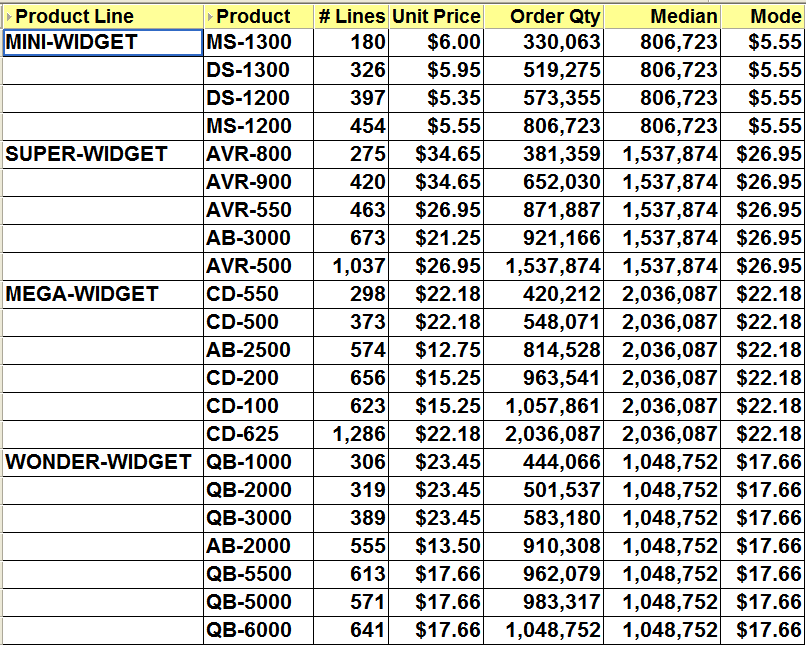
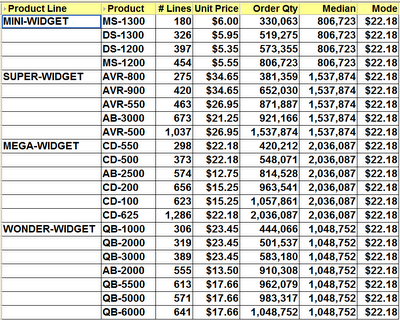
which when inserted into a Discoverer calculation makes my worksheet look like this:
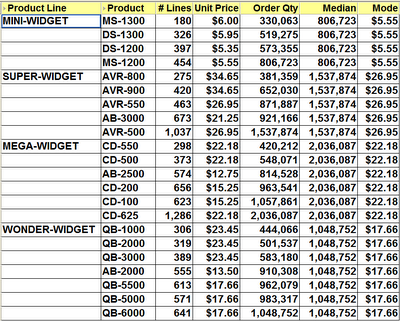
Note: as you can see the mode has been calculated for each group sorted item. Also, even though multiple products have the same unit price, this will still be taken into account. Look at the mode result for SUPER-WIDGET. Discoverer is telling me that the mode is $26.95. This is correct because Discoverer has added the number of lines for both AVR-500 and AVR-550 together, which accounst for more lines than any of the other products in that product line.

If you are interested, here is my calculation inside Desktop:
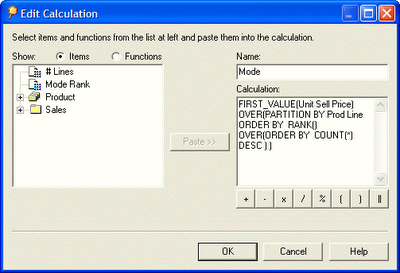
Extending the Mode

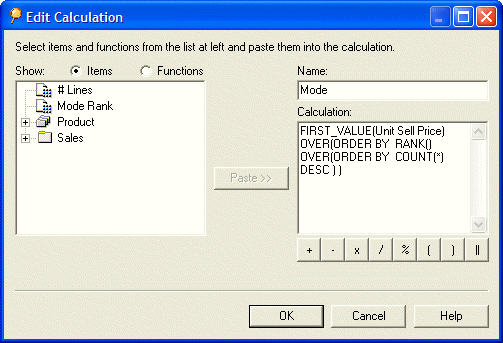
Take a look at the following calculation. You will see that I have altered it to remove the PARTITION BY clause.

FIRST_VALUE(Unit Price) OVER(
ORDER BY RANK() OVER (ORDER BY COUNT(*) DESC))
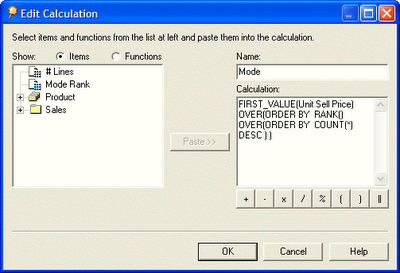

Becasue the PARTITION BY clause has been removed, the Mode now calculates on the whole set. Thus, as you can see below, I have now determined that $22.18 is the Unit Price that is most often used in my organization. This is obviously a price that my customers are willing to pay. Hey, maybe I ought to raise the prices on the lower priced items!
Tuesday, December 12, 2006

Differences between Desktop, Plus and Viewer

One of my good friends, Russ Proudman, has put together a list of the differences between Desktop, Plus and Viewer (link).

If you have any additions you would like to see or of you spot any errors please let me know and I will pass these on to Russ.

Wednesday, December 06, 2006

The low-down about drilling in hierarchies

If you have taken the time to create hierarchies inside the Discoverer Administrator tool, you may be interested in knowing what Discoverer will do when a user drills up and down one of your hierarchies. The answer may well surprise you.

Overview
When a user drills up, Discoverer leaves the original item in situ, adds the drilled-up item to the query to the right of the original item, and leaves the number of rows the same.

When a user drills down, Discoverer removes the original item, replaces it with the drilled-down item, and increases the number of rows to accommodate the new situation.

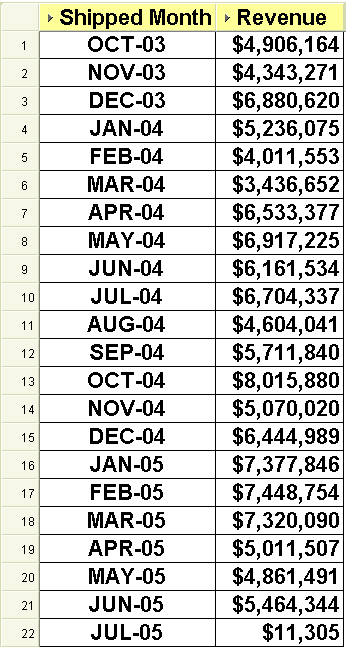
Because a picture tells a thousand words, allow me to explain the above scenarios using sme images from my own system. First of all, I must have a start point. I will then take this base worksheet and first of all drill up from the quarter to the year, followed by drilling down from the quarter to the month:

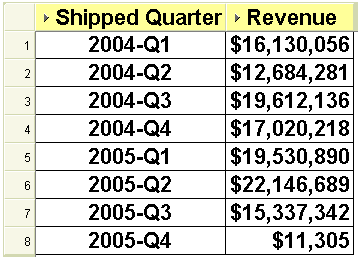
The base worksheet:


As you can see above, this worksheet displays my revenue by fiscal quarter for the fiscal years 2004 and 2005.

Note: for this demonstration, the fiscal year runs from October 1 to September 30.

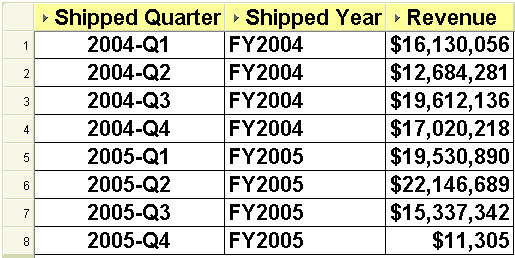
Let's drill UP. When drilling up, the new item is added to the query rather than replacing the original, thus retaining the same number of rows. Interestingly the new (aka summary) drilled-to item is added to the right of the original item rather than to the left which is where it should be. This is all standard Discoverer functionality so please don't shoot the messenger. Personally, I think it would be better if Discoverer were to replace the original item with the drilled-up item and reduce the number of rows to summarize the data. Unfortunately, as you can see below, it does not:

The drilled-up worksheet:


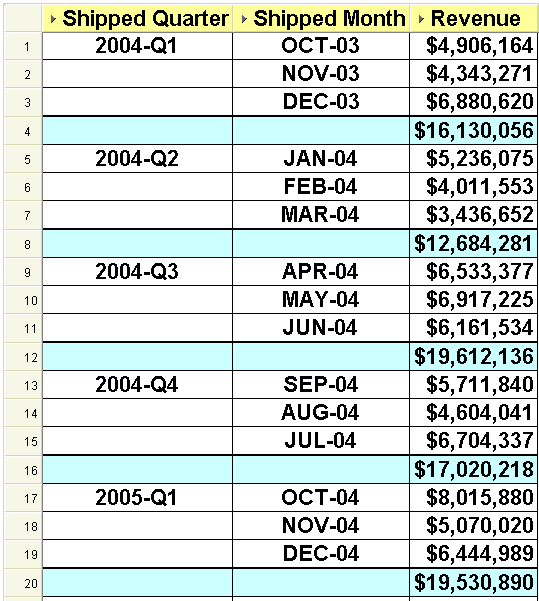
Let's drill DOWN. When drilling down, the new item replaces the original item and Discoverer increases the number of rows to accommodate the new situation. In my opinion, this is also incorrect. I think it would have been better if Discoverer had retained the original item and added the drilled-down item to its right-hand side. This way I could easily add a group sort on the higher-level item with a sub-total on each break.

Here is Discoverer's method of drilling down:

The drilled-down worksheet:


And here is the way that Discoverer could look if the drilled-from item had not been replaced:

The ideal drilled-down worksheet:

Of course, I know you can always edit the worksheet and add back in the item that was removed, which is exactly what I did above.

Wednesday, November 22, 2006

Dashboards - a beginning

I was recently asked about dashboards and where one should begin when the boss comes in and says I want a dashboard. I thought about this for a short while and decided what I needed to do was step back and look at the dashboard concept and explain my understanding in simple terms. I share those thoughts here and invite your comments.

Dashboards are unique to an organization and what works in one place will not be suitable in another. But of course, it all depends on your definition of a dashboard. The one that I like and the one that keeps me out of mischief is this one:

A dashboard or dash board is a panel located under the windscreen containing indicators and dials such as the tachometer / speedometer and odometer.

I bet you never thought it was so easy.

Seriously, look again at this definition and you will see the foundations of business dashboards. It is not the dials such as the tachometer, odometer and fuel gauge that are important. It is atually not the numbers either.

What is really important is the meaning or significance (aka KPI) that we apply to these numbers. Thus, depending upon the situation, a speed of 100 mph might be considered excessive, particularly if being chased by an irate police officer down a busy city street. Do the same thing on a race track and you might be considered a menace for going too slow. But do 100 mph on an autobahn in Germany and no-one will bat an eyelid because it is perfectly acceptable. You can see that the gauge, in this case the speedometer, and the reading from the gauge, 100 mph, are by themself meaningless as a KPI. It is only when you apply the criteria which states that 100 mph must be highlighted in red because it is excessive that a real KPI is born.

The concept of dashboards in automobiles and in business are the same - they give us a snapshot of critical information at a moment in time. If you do happen to be running out of petrol the dashboard will start the indicator to bring this fact to your attention. It does this by turning on a light or sounding a bell when a certain low point in the petrol tank is reached.

Similarly, a business dashboard needs to provide all of the critical information that is needed to run an organization's daily operations. It will be a snapshot in time, probably midnight, that tells an organization if it is spending cash too fast; or whether the percentage of patients who needed a repeat visit is higher than 5%; or whether the number of requests for service this week exceeded the number from last week by more than 10%. You will notice that the common factor here is the rule being applied to the data to indicate that something needs to be brought to the organization's attention.

In a business, you can imagine that every employee has a steering wheel and an accelerator pedal. However, it is not necessary that everyone gets a full-blown dashboard. Since the user roles are different they do not need the same level and kind of information. The worker bees need to work and the managers need to manage. Typically only the higher executives will get the full dashboard priviliges. They want to manage by exception and will only become really interested when something out of the ordinary happens.

If an organization is truly managing by exception then it will have a goal to move routine work from the manager to the employee, this leaving the manager more time to manage. By creating a dashboard that displays the KPIs that the manager is interested in, a quick glance to see that all is green is all that is needed. Good KPIs, and thus good dashboards, reduce micromanagement which is good for everyone involved.

Thus, this is where you ought to begin. You need to find snapshot metrics that when compared to against a set of criteria will have a value above, equal to or below the criteria. Since the manager has access to the dashboard he or she can tell at a glance if the company is running out of petrol, or whether the dashboard can be closed for another day and he or she can get back to running the company.

Now that reminds me, golf anyone!

Wednesday, November 15, 2006

Do not upgrade to Internet Explorer 7

Hi everyone
Based on recent postings in the OTN forums and from investigations with my own clients I have to warn you not to upgrade to Internet Explorer 7 if you are using Discoverer Viewer. After you upgrade to IE 7 you will not be able to drill to a related item because somehow IE 7 prevents you from seeing the list of items that you could drill to. This is certainly true if you are using Discoverer 10.1.2.0.2. Unfortunately, I have no idea whether the latest 10.1.2.2 patch (link to Abhinav's recent posting) fixes this. Does anyone know and has anyone been brave enough to try?

An interesting observation here is that IE 7 is included in Microsoft's automatic updates for XP. Therefore, if you have automatic updates enabled you may come in tomorrow and if you are not paying attention you could find that you have been upgraded. Microsoft state (link) that when the update is downloaded you will be presented with a window that will inform you that IE 7 is ready to install. You should not click Install when so prompted.

IE 7 is currently not certified for use with Discoverer and is also not certified for use against Oracle E-Business Suite 11i (link to Steven Chan's recent posting) Until such time as Oracle certify IE 7 for use against Discoverer and / or E-Business Suite I recommend turning off Microsoft's automatic updates.

Here is a workflow to alter the upgrade policy on Windows XP:

    1. Launch Control Panel
    2. Click Security Center
    3. Click Automatic Updates
    4. Deselect Automatic by selecting one of the other options
    5. Click OK

On my own PC I set this to Download updates for me, but let me choose when to install them. I will then be able to select which updates I want. I certainly don't want to miss out on the other updates, and I certainly don't want to install IE 7 by any act of carelessness or confusion on my part.

Wednesday, November 08, 2006

Are you Microsoft Vista ready?

You've probably heard that Microsoft will be releasing a new version of Windows next year. You've probably heard that the name of the new version is Vista, but is your PC Vista ready?

If you are not sure whether your Windows XP-based PC will be able to run Windows Vista, you can download the Windows Vista Upgrade Advisor RC.

Did you also know that Vista will be coming in six editions?

The planned six editions are:

Starter - will be exclusively* available in emerging markets, and is designed for a beginning PC user with additional tools and tutorials to make it easier to use.
* It is not scheduled to be available in the United States, Canada, the European Union, Australia, New Zealand, or other high income markets as defined by the World Bank.

Home Basic - for basic home needs such as e-mail and internet browsing.

Home Premium - for the best in home computing and entertainment.

Business - for small and mid-sized organizations. For small businesses, Windows Vista Business will help keep PCs running smoothly and more securely so you will be less reliant on dedicated IT support. For larger organizations, Windows Vista Business provides dramatic new infrastructure improvements, enabling your IT staff to spend less time focused on the day-to-day maintenance of PCs and more time adding strategic value to your organization.

Enterprise - for the needs of large, global organizations and those with highly complex IT infrastructures. Windows Vista Enterprise will include built-in tools to improve application compatibility with previous versions of Microsoft operating systems, as well as with UNIX operating systems. In addition to all of the features available in Windows Vista Business, Windows Vista Enterprise is designed to provide higher levels of data protection using hardware-based encryption technology. It also includes tools to improve application compatibility and enables organizations to standardize by using a single worldwide deployment image. Windows Vista Enterprise will only be available to customers who have PCs covered by Microsoft Software Assurance or a Microsoft Enterprise Agreement.

Ultimate - for both work and entertainment. According to Microsoft it will be the most comprehensive edition of Windows Vista. They claim it is the first operating system that combines all of the advanced infrastructure features of a business-focused operating system, all of the management and efficiency features of a mobility-focused operating system, and all of the digital entertainment features of a consumer-focused operating system. For the person who wants one operating system that is great for working from home, working on the road, and for entertainment, Microsoft says that Windows Vista Ultimate is the operating system that lets you have it all.

Click here to see more high-level information about the different editions of Windows Vista and see which one best fits the way you use your computer.

Of course, just because your PC is Vista ready I would not advise you to upgrade when it first comes out. Like me, you will have to wait until Oracle certifies the product that you are using.

However, you can rest assured that Armstrong-Smith Consulting will be getting hold of a copy of the new operating system just as soon as we can and will be testing Discoverer to see how well it works. I'll then be making further postings.

Tuesday, October 31, 2006

Prod Line example code

Hi everyone
I am frequently asked how to create a custom SQL folder that will generate a known list of values. The following two examples of SQL are identical in their output and you are free to choose the one that you prefer. In terms of performance, the first is more efficient but is a little more difficult to understand.

Both pieces of code produce a folder with two items: an item called PRODLINE and an item called SEQUENCE. You can use the SEQUENCE when creating an alternate sort. Have fun!

SELECT
DECODE(ROWNUM,
1,'MINI-WIDGET',
2,'SUPER-WIDGET',
3,'MEGA-WIDGET',
4,'WONDER-WIDGET') PRODLINE,
ROWNUM SEQUENCE
FROM DUAL
CONNECT BY LEVEL <= 4

or

SELECT 'MINI-WIDGET' PRODLINE, 1 SEQUENCE FROM DUAL
UNION
SELECT 'SUPER-WIDGET' PRODLINE, 2 SEQUENCE FROM DUAL
UNION
SELECT 'MEGA-WIDGET' PRODLINE, 3 SEQUENCE FROM DUAL
UNION
SELECT 'WONDER-WIDGET' PRODLINE, 4 SEQUENCE FROM DUAL

Monday, October 30, 2006

Full time Discoverer position

We have a current client ($19 billion dollar consulting firm) who is seeking a permanent Oracle Discoverer consultant to join their team as a full-time employee. Most of the work will be on the east coast, so the client prefers someone who lives east of Texas. The position does require weekly (Mon-Thurs) travel. My client has an excellent compensation and benefits plan, and offers great career growth. Because some of the client work is with government entities, all candidates must be US Citizens. If you are interested please drop me a line at michael@learndiscoverer.com and send me your current resume.

Sunday, October 29, 2006

Back from vacation

Hi everyone
Did you wonder why I have made no postings recently? No, I did not give up blogging and I did not emigrate. I simply took my wife on a long vacation to Mazatlan, Mexico. If you have never been, I thoroughly recommend it, particularly at this time of year as the rainy season is at an end and the snowbirds have not begun to flock.

Anyway, I got back home to Tennessee in the early hours of this morning. I just need to get my feet back under the table and catch up with email then my postings will resume. I actually got less than 12 hours at home as I'm about to leave for Nashville airport to get on another plane. This coming wewk I'm giving Discoverer Administration training and mentoring to a new client in Baton Rouge, Louisiana. At least I get to spend a few more days in the sun!

Followers