Wednesday, January 07, 2009

Cumulative Patch 3 for 10.1.2.3

I am very pleased to announce that Oracle have released a third cumulative patch for Discoverer 10.1.2.3.

So far this has been released for the following platform:
  • Windows 32-bit
  • Linux x86 (works for both 32 bit and 64 bit)
  • HP-UX PA-RISC (64-bit)
  • HP-UX Itanium
The following posting has been updated:

New Armstrong-Smith Consulting Web Site

Hi everyone
I'd like to point you in the direction of our new website. We all think this is a vast improvment on our old website.

First of all we are no longer only focused on Discoverer. We are business intelligence. However, because most of you reading this entry are interested in Discoverer of course the new website is still the place to go.

By the way, there's still time to sign up for my Ask Michael Seminar series which kicks off next week on January 14th.

Tuesday, December 23, 2008

Ask Michael in 2009

Starting in 2009, I will be hosting a free monthly webinar for all aspects of business intelligence and data warehousing. Of course, because I am considered the expert in Discoverer, a large amount of the time will be devoted to answering questions on this hugely popular tool.

The first webinar is scheduled for January 14, 2009

There is plenty of time to submit a question and / or register for the webinar so click here.

A couple of says before the webinar I will contact you with the username and password that you will need for access.

Remember - the webinars are free but you must register with me

ASC Training in Tennessee

Hello everyone
I want to let you know about an exciting new inititiave that my company is starting in 2009. Because we know that many companies only have one or two staff that need our training and cannot afford to have us come on site, we will be offering the same trainng at our own premises starting January.

The training is built around the Higher Education EUL that we developed for SunGard and their clients. If you are unsure whether this would be suitable for you please email me for more details.

Note: Armstrong-Smith Consulting has partnered with SunGard and are the sole authorized partner able to offer this training.

Click here for more information, for prices or to make a booking. By the way if you are a member of the Nashville or Oklahoma City Oracle User Groups we will give each attendeed a 10% discount on the training price and give a further $50 donation to your user group when you complete the training. A Win-Win if you ever heard one!

If you are interested in this training, click here for the Agendas

If you would like more information please drop me an email.

Tuesday, December 09, 2008

Happy Holidays to everyone

Hello everyone. I just wanted to drop you all a line and say thank you to everyone who follows my blog and wish you all very best wishes for the upcoming holidays to you and your family wherever you are in the world. Most of you I know are in the United States but I have a lot of dedicated followers in other parts of the world in countries like the United Kingdom, India, Canada, Australia, Germany, Denmark, China, Kuwait, Saudi Arabia, Russia and dozens more.

If I knew how to send you best wishes in your language I would.

I also wanted to let you all know that I will be starting several new services in 2009 and invite you to email me with your name and email address so that I can let you know when the services will start.

Because many of you have limited budgets and unable to travel for training and help, we are setting up on-line initiatives. One of the most exciting new ventures will be the making available our superb Discoverer training courses to on-line subscribers. We will be offering both our popular Administrator and End User classes for you to follow. We will also have a dedicated trainer available via telephone and email should you have issues.

Discoverer courses:
  • Discoverer Administrator - 14 hours on-line
  • Discoverer End-User - 20 hours on-line
Further, and these have been asked for many times, we will be offering the following brand new on-line courses:

Other Courses:
  • An introduction to SQL - 8 hours on line
  • An introduction to Data Warehousing - 8 hours on line
  • How to maximize your business intelligence investment - 8 hours on-line

These are generic courses not aimed at a particular product and will be very popular.

We will be placing a form on-line in the coming weeks but until then please send me an email with your name and I will make sure you get on our distribution list for these courses. Sending me an email in no way ties you in to buying a course and I will not give your name or email address to anyone else for any purposes. You will only be contacted by Armstrong-Smith Consulting.

Thursday, November 20, 2008

Metalink Note 304192.1 and contexts

Update: This metalink note has now been discontinued. Note 282249.1 gives information on how to pass parameter to a folder using the session client_info. The client_info is a database context available to all sessions in the USERENV namespace. Advantages of using client_info instead of a custom context is that you don't need to create the new context namespace at the database level and also the value of the client_info context can be seen in the V$SESSION dynamic view. However, it can only be used for one parameter and the client_info is used by many applications including the e-Business Suite so you run the risk of overwriting data already stored in the client_info.

This metalink note describes how to pass parameters into a custom folder or database view using stored procedures. The note has been around for quite a while, but as I will explain, the method used will never work reliably in all situations. The note suggests that you use two functions held in a package to set and get a parameter. You use a condition in the view or custom folder to retrieve the parameter, for example:

WHERE ENAME=SETPARAM.GET_PARAM1

Then use another condition in the workbook to set the parameter. The function always returns 1 so is always true.

1=SET_PARAM1(:"Parameter 1")

This approach expects that the SET_PARAM1 function will be called first because it uses constants and so can be evaluated without referencing any tables. However, this will only work if the query in the view or custom folder is not too complex. Once an SQL statement has been sent to the database you have no control over the order in which stored procedures are called. With complex SQL statements, for example, using CONNECT BY, the GET_PARAM1 function will be called first and will return either no value or the last value used.

There is NO reliable way of passing parameters from Discoverer into a custom folder or view using a single SQL statement because the database can call the stored procedures in any order. So any parameter added to the query by Discoverer will probably not be processed before the main body of the query held in a custom folder or view.

Database contexts provide a more efficient and reliable alternative. Database contexts work like session parameters, once the context is set it is available to use for the duration of the session. You can set them or change them using a separate Discoverer worksheet.

To implement Discoverer session parameters you will first have to create a context namespace in the database for the Discoverer contexts.

CREATE OR REPLACE CONTEXT DISCO_CONTEXT
USING EUL_US.DISCO_PKG
/


Then you need to create a package to enable you to set and retrieve contexts from in Discoverer.

CREATE OR REPLACE PACKAGE EUL_US.DISCO_PKG
AS
FUNCTION set_context(p_name VARCHAR2,
p_value VARCHAR2) RETURN VARCHAR2;
FUNCTION show_context(p_name VARCHAR2) RETURN VARCHAR2;
END disco_pkg;
/

CREATE OR REPLACE PACKAGE BODY EUL_US.DISCO_PKG
AS
FUNCTION set_context(p_name VARCHAR2,
p_value VARCHAR2) RETURN VARCHAR2
IS
BEGIN
dbms_session.set_context('DISCO_CONTEXT', p_name, p_value);
RETURN p_value;
END set_context;

FUNCTION show_context(p_name VARCHAR2) RETURN VARCHAR2
IS
BEGIN
RETURN SYS_CONTEXT('DISCO_CONTEXT', p_name);
END show_context;

END disco_pkg;
/


Once you have imported the set_context and show_context functions into the Discoverer EUL you are ready to set and retrieve your session parameters.

With this approach you set your session parameters in a separate worksheet from your main reports. For example, the following steps show you how to create a worksheet to define an effective date parameter:

1. Create a workbook based on any folder containing an item of type date.
2. Create a parameter based on a date.


3. Create a calculation to call the set_context function and set the effective date.


4. Remove the contents from the folder so that the folder just contains a parameter.
5. It is also useful to create another calculation retrieving the value of the parameter, so that the value entered for the parameter can be seen when the workbook is run.

The value of the context in a custom folder or view can be retrieved using a condition, for example:
TO_DATE(SYS_CONTEXT('DISCO_CONTEXT','EFFECTIVE_DATE'))

Every EUL of any complexity should use database contexts:

1. Using SYS_CONTEXT gives better performance. SYS_CONTEXT is an SQL function and therefore much quicker than using calls to PL/SQL.

2. SYS_CONTEXT can be used in any code; in views, PL/SQL code and custom folders. The function can also in the EUL and workbooks; you can import the function into the EUL (from the SYS schema) and use it instead of the SHOW_CONTEXT function. SYS_CONTEXT will always return the current value of the parameter for the session.

3. You can store all your parameters in the same database namespace, so there is no need to change any code if there is a need extra parameters.

4. You can set the database contexts to default values using a login trigger. Then the users only have to run the parameter worksheet if they need to change a session parameter. You can even store the last contexts used in a table, so that a new Discoverer session picks up the values used in a previous session.

However, one limitation of this technique is that Discoverer caches the results of some SQL such as the lists of values and so changing a session parameter will not change a list of values.

Wednesday, November 19, 2008

Discoverer 10.1.2.3 certified for use with E-Business Suite

I am very pleased to announce that Discoverer 10.1.2.3 is now certified against both E-Business Suite 11i and 12i. You must however have applied at least cumulative patch 1 as the base version which you get following an upgrade is not certifed.

E-Business Suite Versions
For more information concerning Discoverer 10.1.2.2 and 10.1.2.3 and E-Business Suite 11i please look at MetaLink note number: 313418.1

For more information concerning Discoverer 10.1.2.2 and 10.1.2.3 and E-Business Suite 12i please look at MetaLink note number: 373634.1

I have also updated my master blog posting on Discoverer releases: http://learndiscoverer.blogspot.com/2008/04/most-useful-patch-numbers.html

Thursday, October 23, 2008

Row Generators

Thank you Michael for inviting me to contribute to your blog. I thought I would start off by talking about row generators and how to use them with Discoverer.


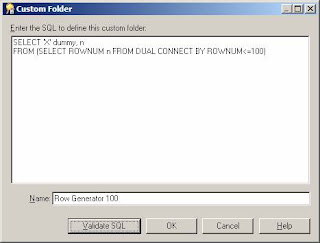
A folder that you can use as a row generator is always useful to have in an EUL. A row generator is just a folder that always returns a fixed number of rows. You can define a row generator either by using a database view or by creating a custom folder as shown below. There is a dummy item included in this row generator so that the folder can be joined to other folders in the EUL.


Lists of Values

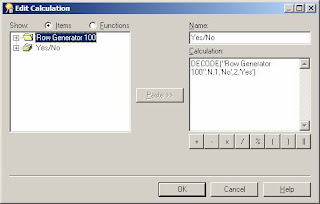
There are many uses for a row generator but they are often most useful when creating a list of values (LOV) where there are a fixed number of values, for example, a Yes/No list of values. To create you LOV first create a new (complex) folder, then drag the N item from the row generator folder into the new folder. You then need to create a mandatory condition in the new folder to restrict the number of rows, for example, in this case N<=2. You can then create a calculated item to return the text used in the LOV. You can use DECODE to convert the number into a text string as shown below.


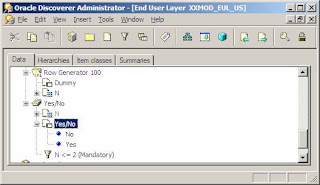
Then create a LOV item class based on the calculated item so that you have a folder that returns the required values as shown below.


Of course this is a very simple example. But in general you will find it easier to have one row generator folder and have complex folders for each LOV. It is easier to use a CASE or DECODE expression than create a new custom folder for each LOV.


Other useful examples are:


List of ValuesCalculationCondition
Days of the weekTO_CHAR(TRUNC(SYSDATE, 'D')+n-1, 'Day')N<=7
Previous 12 monthsADD_MONTHS(TRUNC(SYSDATE, 'MONTH'),
1-n)
N<=12
Letters of the alphabetCHR(65 + n-1)N<=26


This last example where you have a LOV containing the letters of the alphabet is useful when you want to show an index on a text field, for example, bookname. You need to create a bookname_char calculated item, UPPER(SUBSTR(bookname,1,1)) and put this in the alphabet item class. You then need to create a hierarchy from the bookname_char item to the bookname item which will let you select the first letter of the bookname and then drill down to see all names beginning with this letter.


Fixing the number of columns


The row generator is also useful if you need to have a fixed number of columns in a crosstab report. For example you wanted 12 columns, one for each month in the year summarising employee earnings. Now, there will be some employees who do not have earnings for all months in the year. When the report is run for these employees there will be less than 12 columns. If you create a LOV folder for the months you need as described above and outer join the LOV folder to the report folder then you will always get a fixed number of columns in your report.


Pivoting


A row generator can be used to pivot a table or part of table. This is where you want to show values that are in different columns on separate rows.

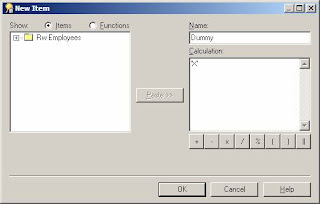
For example, if your employee table has columns for the hours worked on each day in the week and you need a report showing the total hours on each day of the week by department. So in this case you need to pivot the hours onto separate rows. You do this by creating a days of the week folder that always returns 7 rows as described above. Make sure you also include the dummy item from the row generator folder. Then create a dummy item in your employee folder as shown below.


You can then join the employee table to the days of the week folder using the dummy item. Then in the workbook create a calculation to show the total hours for any day using:


SUM(DECODE("Row Generator 100".N,
1, Employees.mon_hrs,
2, Employees.tue_hrs,
3, Employees.wed_hrs,
4, Employees.thu_hrs,
5, Employees.fri_hrs,
6, Employees.sat_hrs,
7, Employees.sum_hrs))


You can then select the day from the days of the week folder, the department from the employees folder and the hours calculated item to get the sum of the hours for each day of the week.


Counting records many times


The row generator can be used to multiply rows when you want to count the rows several times.

For example, if you have a report that shows when users logged on and off your system but you want a chart showing the how many users are logged on during each hour during the day. This means that if there is a record showing user A logged on at 8am and logged off at 11:50am then this record needs to be counted 4 times, once for each hour the user was logged on.

You need to create an hours row generator folder as described above that returns the 24 hours in the day using an hours calculation shown below :


TO_CHAR(n-1,'fm09')


Now if the user logon and logoff times were held in a user_timings folder then you need to join the hours row generator folder to this folder using a dummy item as described in the previous section. This will multiple each row 24 times. Then a condition in the workbook can be used to return only the hours when the user was logged onto the system:


Hours BETWEEN TO_CHAR(TRUNC(logon, 'HH24'), 'HH24') AND TO_CHAR(TRUNC(logoff, 'HH24'), 'HH24')


You can then count the records and group sort on the hours calculation to return the data you need for the chart.


This of course assumes that all users log on and off on the same day. You would need a slightly more complex condition if users where able to logon and off on a different day.

Tuesday, October 21, 2008

Pictures of Darlene and Michael

Many of you know Darlene, my wife, and I as the owners of Armstrong-Smith Consulting and the authors of the Oracle Discoverer Handbook. Here are some photographs of us taken in our offices recently:


Thursday, October 16, 2008

Interesting condrum with indexed values

As you know from a previous posting it is possible to create Discoverer lists of values to display a lookup description e.g. Department Name and return the primary key code namely, Department Id when using a list of values in a parameter.

What I have discovered today is something very intersting in the way that Discoverer does this and something that you ought to be aware of.

Let's say a bottle manufacturing company has a whole series of bottles which they describe using the color of the top. Some descriptions would be 1 Litre Blue Top, some 1 Litre Red Top and so on. Let's also say that they start out with code 10 represting 1 Litre Blue Top, and code 11 representing 1 Litre Red Top.

Inside Discoverer Plus, if a user has an indexed item in use and they choose to select using the Values option (see my original posting if you are unsure what this looks like) they will be presented with a list of values like this:
  • (1 Litre Blue Top) 10
  • (1 Litre Red Top) 11
What you may not be aware of is what Discoverer submits to the database. This is what will get submitted:

(((o100539.PRODUCT_DESCRIPTION) = '1 Litre Blue Top'
AND o100539.PRODUCT_CODE = '10'))

Yes, Discoverer actually adds an AND clause for BOTH parts of the equation. It searches for both the Code and the Description. I can see why this is happening. This is to solve the following problem:

Let's say the bottling company later decide to introduce an updated version of the 1 Litre Blue Top and decide to use code 20. Because there are two items with the same description, if Discoverer were to only submit this:

(o100539.PRODUCT_DESCRIPTION) = '1 Litre Blue Top' )

then both items would be returned in the query. The only way to guarantee to get the right combination would be for Discoverer to add the AND clause.

Somebody recently asked me why Discoverer didn't use an OR connector, like this:

(((o100539.PRODUCT_DESCRIPTION) = '1 Litre Blue Top'
OR o100539.PRODUCT_CODE = '10'))


If Oracle were to change the code to an OR condition then we would definitely get multiple rows returned so Oracle's choice of using an AND clause seems to be correct.

So why then am I bringing this to your attention. I'll tell you why.

Let's say the bottling company decides to rename the description for bottle 10 to this 1 Litre Top - Blue. No big deal you might think because there is still only one description for that code - wrong!

Let's say a user opens a workbook containing a worksheet that has a such an indexed parameter and that the last time it was used either the code 10 was selected or it is being supplied as the default value. Because the parameter already has the value displayed on screen all the user needs to do is to accept the current value and click Finish. Because the user does not reselect 10 and just clicks Finish what gets submitted to the database will still be the original AND clause:

(((o100539.PRODUCT_DESCRIPTION) = '1 Litre Blue Top'
AND o100539.PRODUCT_CODE = '10'))


Yes, now you can see the conundrum. No data is returned because there is no product called 1 Litre Blue Top in the database. Discoverer does not reassess the situation when an existing parameter is used. Is this a bug? Maybe. I will send this to Oracle for comment but I thought you would like to know.

I think the workaround would be to pick a new paramater value from the list, then go back and repick the original value. Assuming the worksheet now returns data the worksheet needs to be resaved. Of course, this also assumes that the user using the worksheet is the worksheet owner. If they are not the owner then the problem will persist until the owner can be notified.

As I say - an interesting conundrum!

Tuesday, October 14, 2008

Welcome to Rod West

I am delighted to be able to let you know that Rod West, a prolific answerer of questions on the OTN Discoverer Forum, will be joining me as a co-author on this blog.

Rod has been using Oracle databases since 1985 and is principal consultant at Cabot Consulting in the United Kingdom. He specializes in Oracle Applications 11i / 12i as well as Oracle Discoverer. Rod can be contacted at rodwest@cabotconsulting.co.uk

Rod has also submitted two white papers, both of which are available for immediate download from my website by clicking here

The papers are as follows:

  • Scheduling through concurrent manager - this paper describes how Oracle Applications Concurrent Processing can be used to schedule Discoverer workbooks
  • Using VPD to secure Discoverer reports - this article uses a series of examples to demonstrate how VPD can be used to secure Discoverer reports. The examples have been written with Discoverer in mind but VPD is a database centric approach and so can be applied to any reporting tool

Monday, October 06, 2008

Cumulative Patch 2 for 10.1.2.3

I am very pleased to announce that Oracle have released a second cumulative patch for Discoverer 10.1.2.3.

So far this has been released for the following platform:
Windows 32-bit

The following postings have been updated:

Useful Patch Numbers
Do not upgrade to Discoverer 10.1.2.3

Important Note: Neither the base 10.1.2.3 nor any of its cumulative patches are certified for use against E-Business Suite 11i or 12i, so please don't upgrade to 10.1.2.3 if you are using or intend to use Discoverer in Apps mode. 10.1.2.2 and all of its cumulative patches are certified so this is where you should be, at least for the time being.

Tuesday, September 16, 2008

Be careful installing cumulative patches

I can't stress the importance of making sure you read all of the instructions in the readme files that come with the cumulative patches. For example, the readme for cumulative patch 8 on Windows has the following statement concerning OPatch:

2. It is always recommended to have the lastest 1.0.0.0.xx opatch version.
Minimum opatch version is 1.0.0.0.57
Opatch version can be checked following the below steps:
- set ORACLE_HOME=
- set OPatch in the PATH
- opatch version

However, the same readme for the Linux install has this statement:

2. It is always recommended to have the lastest 1.0.0.0.xx opatch version.
Minimum opatch version is 1.0.0.0.58
Opatch version can be checked following the below steps:
- set ORACLE_HOME=
- set OPatch in the PATH
- opatch version


Notice that the minimum OPatch versions are different. This is very important.

Warning: If you attempt to install CP8 on Linux using OPatch 1.0.0.0.57 the install will fail and you will get a message saying that the inventory could not be updated.

Unfortunately, by this point the cumulative patch code will already have deleted some required files and so now even your original Discoverer will not work. The solution is to install the correct version of OPatch and rerun the cumulative patch. It will now put the right, required files in place and Discoverer Plus will operate correctly.

The moral of the story is to read the installation notes carefully so that you don't get caught out.

Friday, September 05, 2008

Revised Apps mode white paper

As many of you already know I am the author of several white papers on Discoverer.

I am pleased to be able to let you know that I have today publised a fully revised version of the popular Setting up an Apps mode EUL.

You will find it on my downloads page.

It has the following 5 sections:
  1. Installing the Admin software
  2. Setting up Discoverer to work with E-Business Suite
  3. Patching Discoverer Admin to the correct level
  4. Creating an E-Business Suite End User Layer
  5. Setting up E-Business Suite privileges

Wednesday, August 27, 2008

Cumulative Patch 8 addendum

A few days ago on 15th August Oracle released a second edition of CP8. This edition, using patch number 7306816, is only for the following 3 platforms:
  • Linux x86
  • Sun Solaris SPARC 32-bit (which is also good for 64-bit)
  • HP-UX PA-RISC 64-bit

The reason for the updated patch is to fix some additional bugs specific to these platforms, namely:

BUG 6742626 - DISCOVERER DISCONNECT IF WE DRILL TO RELATED TO THE SAME ITEM TWICE
BUG 6933011 - 'AN ERROR OCCURRED WHILE ATTEMPTING TO PERFORM THE OPERATION' WHILE OPENING REPO
BUG 6686944 - FONT SIZE TOO SMALL EVEN IF ADJUSTPLUSFONTSIZE = "TRUE" AND ZOOM SET

If you are using Solaris and have already applied the initial patch then you should be fine, but since 7306816 has three more patch fixes, then this will be the one recommended by Oracle Support going forward if it is available for a specific platform. Personally, if I was on Solaris, I would apply 7306816 even if I had already applied the original 7111816. I like to have the latest fixes where possible.

As I say, it is currently released on Solaris, Linux and HP-UX.

The Windows platform will continue to use 7111816

See also:

My Original CP8 posting

My posting concerning patch numbers

By the way, if you are using E-Business Suite 11i or 12i then all of the cumulative patches for Discoverer 10.1.2.2 are certified for use. You do not need to wait for further confirmation by Oracle as this is part of the patch release testing.

However, neither Discoverer 10.1.2.3 nor its recently released CP1 are certified for use with E-Business Suite so do not upgrade to 10.1.2.3 at this time. 10.1.2.3 is a non-reversible upgrade so don't go there if you are using E-Business Suite. You have been warned!

Friday, August 15, 2008

Cumulative Patch 1 for 10.1.2.3

I am very pleased to announce that Oracle have finally released a cumulative patch for Discoverer 10.1.2.3.

So far this has been released for the following 3 platforms:


  • Windows 32-bit
  • Linux x86
  • Sun Solaris SPARC (32-bit) - which means 64-bit as well

The following postings have been updated:

Important Note: Neither 10.1.2.3 or CP1 is certified for use against E-Business Suite 11i or 12i, so please don't upgrade to 10.1.2.3 if you are using or intend to use Discoverer in Apps mode. 10.1.2.2 and all of its cumulative patches are certified so this is where you should be, at least for the time being.

Wednesday, July 30, 2008

Cumulative Patch 8

Posting updated: August 27, 2008

Oracle have recently released CP8 for Discoverer. The patch number for Windows is 7111816. The patch number for Linux, Unix and HP is 7306816. While 711816 was also released for Unix, this has subsequently been re-released with further improvements as 7306816. If you are running on Unix and have already applied 7111816 you should also apply 7306816. This will de-install the previous CP8 and install the latest version complete with additional bug fixes.

My blog posting relating to patch numbers has been updated to reflect this new cumulative patch.

For more information about patches for Discoverer click here.

At the moment CP8 is available for these platforms:
  1. Microsoft Windows 32-bit - using 7111816
  2. Sun Solaris SPARC 32-bit (which is also good for 64-bit) - using 7306816
  3. Linux x86 - using 7306816
  4. HP-UX PA-RISC 64-bit - again using 7306816

Some welcome fixes:

Welcome fix 1

Looking through the readme it seems as though Oracle may have fixed the CP7 issue that I reported a couple of weeks ago. I have tested this out on my own system and the list of values now populate with no problem.

Welcome fix 2

Another bug, this time one that has irritated end users for some time, has been fixed in this patch. Prior to this patch, if someone shared a workbook with you and you tried to Save As using the same name you would get an error that the workbook identifer must be unique. You would then be forced to save the workbook under a different name which was most inconvenient. I am very pleased to report that has been fixed in CP8.

Let's say that someone shares a workbook with you called Sharing Test.

Under the new functionality, if you use Save As and leave the workbook name the same, Discoverer will automatically assign a unique identifer to the workbook. What it does is to append the number 1 to the end of the identifier. Thus, in my example, the identifier for this workbook will become SHARING_TEST1. I know this fix will be welcome news to hundreds of users.

Good one Oracle - 10 out of 10 from me for this fix.

Welcome Fix 3

One other "fix" that may be welcome to you in CP8 is that changing Page Items in Discoverer Plus cross-tabular worksheets and scrolling has been incrementally improved. I'm not sure if you have ever noticed this as it generally only rears its ugly head when working with more complex type worksheets. Performance is still not "Desktop" speed due to the architecture differences, but it is much improved. The generic scroll properties that were introduced in CP2, I think, may no longer needed. If you have been having issues with those sort of "performance" issues, then you might want to give CP8 a try.

The particular bug fixes that I am referring to in CP8 are as follows (this information is taken from the CP8 readme):

328) Bug 7166233 - WITH SOME SCROLL PREFERENCES, TABULAR WORKBOOKS WILL LOCKUP WHEN SCROLLING

329) Bug 6938007 - CHANGING PAGE ITEMS IN PLUS RENDERS THE PAGE VERY SLOWLY

Wednesday, July 16, 2008

Speaking in Oklahoma in July

If you happen to be in Oklahoma City on Tuesday, July 22nd I will be presenting a paper on manipulating dates in Discoverer at the Oklahoma City Oracle User Group meeting.

This will be at the Francis Tuttle Institute of Technology, Rockwell Campus, in Oklahoma City on 12777 N. Rockwell Ave at 5:15pm

For more information please look on the OKCOUG website

I'll see you there

Monday, June 16, 2008

Discoverer polls 1 and 2

So that I can provide a better service to the industry, from time to time I will be conducting polls of the Discoverer commulity on various topics.

The results from the first 2 polls can be seen in the panel to the right. As you can see they make very interesting reading.

Thursday, June 12, 2008

Monitoring and removing old statistics

This is a posting for Discoverer administrators.

As you may know, there is a switch on the Privileges screen called Collect Query Statistics.

Most organizations leave this turned on. When it is turned on, every time an end user logs in and runs a worksheet, statistics about that run are collected into the table called EUL5_QPP_STATISTICS. Thus, there will be one row in the statistics tables for every execution of every worksheet in every workbook. Even if an end user creates only an ad-hoc query and doesn't save it to the database the statistics will still be captured.

If your organization has lots of users executing lots of worksheets every day you can imagine that this table will get quite large. Another thing that happens is that over time the extents on the indexes, of which there are 3, grow rapidly to many thousands. What this means is that performance is going downhill.

Here are the 3 indexes:

  • EUL5_QS1_I
  • EUL5_QS2_I
  • EUL5_QS_PK

You therefore want to consider purging your statistics from time to time. Many organizations that I have worked with like to keep at least the last six months of statistics, although some only keep 90 days.

What you may not be aware of is the fact that Oracle supply a SQL script that can check the statistics and, optionally, delete those which are over a number of days old. The script also provides a report on how many entries there are in the table, in buckets of 10 day increments, like this:

You can find the script here on your Admin machine:
[ORACLE_HOME]\discoverer\util

It is called: EULSTDEL.SQL

To run the script, use this workflow:
  1. Log in to SQL Plus as the owner of the EUL
  2. Type this @c:\oracle\bitoolshome_1\discoverer\util\eulstdel.sql and press Enter
  3. You will be prompted to enter a parameter. This parameter is the number of days of statistics you want to keep. If you want to keep all of your statistics, enter a large number or just run the SQL at the end of this posting. If you enter 0 the script will delete all of your statistics because it actually deletes rows which have a created date less than SYSDATE minus this number. Therefore, be careful!
  4. The SQL will run and produce the report, optionally deleting your old statistics

Note: in step 2 of the above workflow I have included the most-commonly user location for the Discoverer Admin tool. If yours is not in this location you will need to change this line.

Having deleted the statistics, you will more than likely want to ask your friendly DBA to rebuild the 3 indexes listed above, and again below. I have seen terrific improvements in performance when this has been done.

  • EUL5_QS1_I
  • EUL5_QS2_I
  • EUL5_QS_PK
By the way, if you just want to see your statistics, here is the SQL:

SELECT
TRUNC(SYSDATE-QS_CREATED_DATE,-1) Days_Old,
COUNT(*) No_of_stats
FROM EUL5_QPP_STATS
GROUP BY TRUNC(SYSDATE-QS_CREATED_DATE,-1)
ORDER BY 1 DESC

Followers