Wednesday, August 30, 2006

Your help is needed

Are you interested in pushing the envelope for inter-connectivity between the Oracle BI tools and Microsoft Office? If so, we want to hear from you.

In co-operation with Armstrong-Smith Consulting, Oracle is looking to talk to and possibly meet with customers in the US that are using any form of Microsoft Office / Excel plug in for their BI data and reporting.

Thus, if you are using one of the following:
  • Oracle Excel Spreadsheet Add-In 10.1.2
  • BusinessObjects Live Office
  • MicroStrategy Office
  • MIS Plain - the Excel Add-In for Microsoft SQL Server
  • Hyperion Essbase Spreadsheet Services Add-In
  • OutlookSoft, and so on...

and are interested in talking or meeting with someone from Oracle, please let me know by dropping an email to me, and I will make the arrangements.

Monday, August 28, 2006

Third party scheduling and emailing - 1

Of the many missing "features" of Discoverer is the ability to schedule and email reports. As many of you are are, scheduling can be done using one of a multitude of third-party scheduling tools. The one that I like is the native scheduler that comes with Windows XP.

Coupled with Discoverer Desktop's command-line interface it has always been possible to schedule the execution of a Discoverer workbook and export the output in a selected format, to a named file in a named folder. The difficulty has been in the emailing of that report. While there are a myriad of ways to email something, one of the simplest involves a product called Febooti. I discovered, pardon the pun, this product a few days ago and purchased a commercial license straight away. Now I can honestly say that all of my emailing problems have gone away and I can finally put this issue to bed.

With febooti Command line e-mail you can:
  • Send email from the dos prompt to any number of recipients.
  • Send attached files, text or HTML with embedded pictures.
  • Send email using CC and / or BCC (Blind Carbon Copy).
  • SMTP authentication (PLAIN, LOGIN, NTLM, CRAM-MD5).
  • Secure connections by using -SSL and -STARTTLS.
  • Set SMTP server address and SMTP server port.
Advanced features:
  • Create batch files to send email from any* program.
  • Easy-to-use command line switches with alias support.
  • Unlimited TO, CC and BCC number of recipients.
  • Take parameters from external text file or files.
  • e-update - checks for updates automatically.

I will be posting more information on this subject, including example scripts and a white paper during the coming weeks. For more information see my website (link).

Nice feedback

I received some feedback on my MetaLink postings a couple of days ago. Because it feels good to get nice feedback I asked Melinda if I could share her thoughts and she has given me full permission to do so. By the way, I also answer questions on the OTN Discoverer forum. If you want to see my recent OTN postings click here.

Here is Melinda's feedback:

I attended your pre-conference Discoverer session at this year's OAUG conference in Nashville. I just wanted to drop you a quick note and say THANKS for replying to the Discoverer questions in the Metalink Technical Forum. I periodically read through the questions to see if anything is relevant to me, and must say I really appreciate your answers. You have a wealth of knowledge and sharing them with the Discoverer community through this forum is extremely helpful and allows me to learn more through you then spending days bothering our DBAs and researching on my own.

I'm not sure if Oracle contracted with you to post responses (they should !) but I really appreciate your taking the time to help us out.

Thanks again,
Melinda Bedford

State Corporation Commission

Sunday, August 20, 2006

The trouble with alternate sorts and custom folders

Discoverer's alternate sort is one of those wow features that once learned has a tendency to be used over and over again. When the alternate sort is based on a small, known set of values created in a custom folder the end result is just what the doctor ordered. However, when the SQL inside the custom folder is dynamic and is drawn from one or more database tables then, because of a little-known feature of the nature of alternate sorts, Discoverer performance can and will deteriorate. The use of the alternate sort is therefore like a double-edged sword. On the one hand, you can create lists of values in exactly the order requested by the users. On the other hand, performance can down the drain - big time!

So why does the performance go down? It goes down because whenever a user includes an item in a workbook that has an alternate sort associated with it, Discoverer embeds the SQL used in the custom folder within the query for the workbook. It does this just in case the user wants to sort by the item. As you probably know, when a user adds a sort on an item that has an alternate sort, Discoverer will sort the workbook data in the order as defined by the alternate sort. The only way it can do this is by including the alternate sort code within the query.

Let me show you using an example from my own database, the one used in my Discoverer 10g Handbook. I have a custom folder called Prod Size Lookup containing the following code:

SELECT 'MINI' PRODSIZE, 1 SEQUENCE FROM DUAL
UNION
SELECT 'SMALL' PRODSIZE, 2 SEQUENCE FROM DUAL
UNION
SELECT 'MEDIUM' PRODSIZE, 3 SEQUENCE FROM DUAL
UNION
SELECT 'LARGE' PRODSIZE, 4 SEQUENCE FROM DUAL;

This creates a folder with two items, one called Prodsize and one called Sequence. I then created a list of values based on the Prodsize using the Sequence as the alternate sort. This allows my users to see the values in a more natural order, the order shown above. Similar code can be used for days of the week and months of the year. So far so good. Next I created a simple workbook that queried just the Prodsize. Here is the code that was generated by Discoverer:

SELECT
o100558.PRODSIZE AS E100726,
as100626_100726_OLD AS as100626_100726_OLD
FROM GSW.GS_PRODUCTS o100558,
( SELECT o100572.PRODSIZE AS as100626_100726_OLD_2,

MAX(o100572.SEQUENCE) AS as100626_100726_OLD
FROM
( SELECT 'MINI' PRODSIZE, 1 SEQUENCE FROM DUAL
UNION
SELECT 'SMALL' PRODSIZE, 2 SEQUENCE FROM DUAL
UNION
SELECT 'MEDIUM' PRODSIZE, 3 SEQUENCE FROM DUAL
UNION
SELECT 'LARGE' PRODSIZE, 4 SEQUENCE FROM DUAL

) o100572 GROUP BY o100572.PRODSIZE)

WHERE ( (0100558.PRODSIZE = as100626_100726_OLD_2(+)));

So what happened here? First of all, I bet you are amazed at the amount of code that has been generated. As you can see, Discoverer has not only embedded my custom SQL within the main query but has also added an outer join, shown as(+), between the two components. Now, because my list of values is a small, known set of items, this additional code has a marginal impact upon my query. My explain plan looks like this:

SELECT STATEMENT
HASH JOIN OUTER
TABLE ACCESS FULL GSW.GS_PRODUCTS
VIEW DRAKE
SORT GROUP BY
VIEW DRAKE
SORT UNIQUE
UNION-ALL
FAST DUAL
FAST DUAL
FAST DUAL
FAST DUAL


So now let's move into the real world, the world of Oracle E-Business Suite, where the custom SQL is executing another query to get the list of values. Using such custom SQL with an alternate sort causes Discoverer to generate code such as this:

SELECT /*+ ALL_ROWS */
o114210.PERIOD_NAME AS E187845,
as120354_187845_OLD AS as120354_187845_OLD
FROM GL.GL_JE_HEADERS o114210,
( SELECT o779427.PERIOD_NAME AS as120354_187845_OLD_2,
MAX(o779427.SORT_KEY) AS as120354_187845_OLD

FROM
( SELECT PERIOD_NAME,
PERIOD_YEAR,
REPLACE(PERIOD_YEAR,TO_CHAR(PERIOD_NUM,'09'), ' ') SORT_KEY
FROM GL.GL_PERIOD_STATUSES

WHERE
APPLICATION_ID = 101 AND
SET_OF_BOOKS_ID = 1 ) o779427

GROUP BY o779427.PERIOD_NAME)
WHERE ( (o114210.PERIOD_NAME = as120354_187845_OLD_2(+)));


You can see that this may have an impact of performance. It may well bring back more rows of data than expected so the user may well have to check the Hide Duplicate Rows box in the Table Layout tab of the Edit Worksheet dialog box.

By the way, the same query that I used at the beginning of this posting looks like this when I have no alternate sort:

SELECT O100558.PRODSIZE
FROM GSW.GS_PRODUCTS O100558;


and my explain plan looks like this:

SELECT STATEMENT
TABLE ACCESS FULL GSW.GS_PRODUCTS;


Therefore, when managing alternate sorts, you need to:

  • be careful and only use them when the list of values is either fixed and can be generated by a SQL statement that does not access the database, or the list of values is small and the SQL statement is extremely efficient and does not generate duplicate values.
  • be frugal and don't get carried away. Create them when absolutely necessary, and not just because the users asked for them.
  • test them out with realistic before and after scenarios. This way you can make sure that performance is not being adversely affected, and if it is - don't use them, simple as that!
For all of you who have asked why Discoverer sometimes adds an outer join, take a close look at your End User Layer. The inappropriate use of alternate sorts could be one of the reasons.

Thursday, August 10, 2006

More to toolbar icons graying out

Are you using Discoverer 10.1.2 with the Sun Java 1.5 plug-in? If so, you may have experienced one or more of the following:
  • Not being able to use a list of values dialog.
  • Not being able to enter a workbook name in the 'save' or 'save as' dialog without switching to another application and coming back.
  • Message about the Digital Signature / Digital Certificate being expired.
  • Time Fields always shown as zeros (0) in Plus/Viewer.
  • Color picker not working correctly.
  • Toolbar icon greying out intermittently.
You may well be interested in taking a look on MetaLink for the following note: 367389.1 which describes all of the above symptoms. The note also states that a recommended patch fix 5345528 has been released. This patch is a secure patch and only available from Oracle if you raise a service request (SR) on MetaLink and state that you are having one of the issues addressed by the patch. Oracle will then give you a password that you can use to download the patch.

Here is a full list of the "bugs" fixed by patch :

4206793 - TCH11IX JDK50 UNABLE TO INPUT SHEET NAME/WBK NAME, HAVE TO TRY FEW TIMES
4360769 - JDK 1.5 DROP DOWN LIST DONT SHOW CURRENT SELECTED ITEM WHEN PLUS USES JDK1.5
4392717 - IF THE CALCULATION ITEM VALUE IS 0 THEN IT IS DISPLAYED AS 00 IN DISCOVERER PLUS
4493163 - OPENING IN PLUS WORKBOOK CREATED IN DESKTOP FAILS
4567795 - JEWT 4.2.35 SELECTED COLOR NOT GETTING PICKED UP FROM THE FORMAT DIALOG.
4631865 - DISCO PLUS WITH IE IN WINDOWS 2003 AS CLIENT HAS PAGE REFRESH ISSUES
4707854 - NLS TIME FIELD IS ALWAYS SHOWN AS ZEROS IN PLUS AND VIEWER
4778465 - PATCH 4707854 FIXES BUG 4392717 FOR PLUS BUT NOT FOR VIEWER
4926873 - PLUS PRINT FIT TO PAGE DOES NOT WORK ON HYPERTHREADED CLIENT PCS
4926890 - PLUS PRINT MISSING TITLES, HEADER; FOOTER ON HYPERTHREADED CLIENT PCS
4939445 - DISCOVERER PLUS EXPORTED XML FILE WITH TITLE PARAMETERS CREATE 0 FONT SIZE
5043830 - SECURITY CERTIFICATE HAS EXPIRED OR IS NOT VALID WHEN ACCESSING PLUS

5085248 - PLUS SAVE DIALOG NOT WORKING WITH MLR 5047079 AND SUN PLUGIN 1.5.0_06

Wednesday, August 09, 2006

A couple of database scripts

Here's a couple of scripts that I thought you might be interested in.

The first returns the current size of the database in gigabytes, rounded to two decimal places. It ignores the TEMP and the UNDO segments.

SELECT ROUND(SUM(BYTES)/1024/1024/1024,2) DB_SIZE
FROM DBA_SEGMENTS
WHERE SEGMENT_TYPE NOT IN ('TYPE2 UNDO','TEMPORARY');

The second displays a list of the segments that you have. Using this list you can identify the UNDO segment(s) that you supply to the above script.

SELECT DISTINCT SEGMENT_TYPE FROM DBA_SEGMENTS;

Tuesday, August 08, 2006

Non-aggregated items and joins

The message "more than 1 of the detail folders users non-aggregated items" means that you must have a numerical item using SUM in one folder and using Detail in the other. It could even be the column that you are joining on. Common examples of this are Sales Order Numbers and Line Numbers. If these are defined as numbers, as opposed to VARCHARs, by default Discoverer will apply a mathematical aggregator to these. This could be SUM or it could be Detail depending upon what you chose as the default when you created the business area.

However, later on you may have added a new folder and inadvertently assigned the other aggregator. So, what can you do? Well, there are two ways of handling this. You could go through and change the aggregator so that they align but to me this is still wrong if the data is something like a Sales Order or Line Number. For these, you need to change the Default Position to one of Top, Page, Side or Top or Side. Basically you want it to be defined as anything other than Data Point.

To check the above, use this workflow:
1. Launch Discoverer Administrator
2. Open the business area in question
3. Open one of the folders
4. Look at your items, particularly those with a little calculator icon alongside, and right-click on the item
5. From the pop up menu, select Properties
6. In the Item Properties dialog box, look at the current setting for the property called Default Position
7. If this setting is wrong, click in the cell and select the appropriate setting - I usually select Top or Side
8. Click Apply
9. Go back to step 4 and repeat steps 4 to 9 until you have checked all of the items
10. Click OK to close the Item Properties dialog box
11. See if you can now create the join

Discoverer will create an outer join if the column you are joining can have null values. Basically if there is no database constraint defined matching up the columns Discoverer will assume that the columns can be null, therefore creating an outer join.

I will be posting some more very interesting Discoverer snippets and tricks in the coming weeks so stay tuned. In the meanwhile, if you have a question or trick that you would like to see published, drop me a line at michael@learndiscoverer.com

Wednesday, July 19, 2006

What motivates you?

I like to find out everything about Discoverer, Application Server, SQL and so on. Because of this, I like to have some quiet time to myself to figure things out, to do my what-if analysis, and to try out all those little ideas that popped into my mind since the last time I had some quiet time. This ability to have such leeway in my work really motivates me, but does it make me a geek? Probably. However, what motivates me might not be the same as what motivates you.

A very interesting article entitled Top 10 ways to motivate geeks (link) was posted today on The Retrospector blog. I think the author hits on most of the important ways, but not necessarily in the right order for me. Number 6, though, is an interesting concept because I for one do like to pick up meaningless items at conferences. I can't be the only one either because everyone I saw leaving the recent Collaborate and Kaleidoscope conferences, in Nashville and Washington respectively, had bags crammed with goodies.

So what motivates you? Feel free to take a look at the article and add a posting.

Incidentally, I uncovered another article entitled Top 10 ways to demotivate geeks (link) which also makes for interesting reading.

Thursday, July 13, 2006

Technology Isn't Always The Answer

I'm an avid reader of the ITtoolbox Blogs and a posting that came in today (link) made for interesting reading. The main point of the article was to discuss some thought processes that are used to rate new ideas. The conclusions were as follows:

The "greater good" or "the good of the masses" - The process or problem has to be of a certain size and must be substantial. Develop your measurements according to the type and size of the business that you are serving. The criteria to be considered substantial will differ greatly depending on the environment in which you find yourself.

Solve core process issues and needs - Drill down into the surface process or problem. Don't just treat the symptoms - find the disease. How does the process or problem relate to the critical functions of the business?

Ask yourself this - If I could implement my change tomorrow what immediate and measurable impact would it make? If you can't list at lease 3 substantial impacts to critical functions you need to rethink. If you can list 3 you need to return to the "greater good" and critical function analysis - make sure it will serve the greater good and will make a medium to substantial impact on at least one critical function.

Don't be taken in by the latest and greatest - a year ago I was enamored with new BI applications - today I'm not happy with them. Always look forward.

While I don't necessarily agree with all of the comments made by the author, I particularly liked the last comment. Don't you find it true that there is a lot of hype these days about how great the next BI idea is and how it will revolutionize what we do? It is interesting to look back, as the author comments, one year ago and see just how few of the "hit" ideas from then actually made it through to today. Many are still being touted as the way to go. I'm sure you can name some of them.

Tuesday, June 27, 2006

Lost or grayed out icons in Discoverer Plus

I have been researching the issue over lost or grayed icons and it is definitely an issue with Java memory on the local PC. So far, my research indicates that you need to increase the Java heap memory. I am still researching but here is what I have so far:

You may want to alter the maximum memory heap value for your Java. To do this, use this workflow:

  1. From the Start button, use Settings > Control Panel.
  2. Double-click Java Plug-in .
  3. On the Advanced tab, set the Java Runtime Parameters to something like:
    –Xmx256m
  4. Click Apply .

This sets the maximum amount of memory to allocate to Java to be 256 Mb. The installed default is 64 Mb which in my opinion is way too low. You can alter the maximum (-Xmx) to other values if you have plenty of memory but 256m seems to work very well. Generally I would not set the maximum to be more than 25% of your system memory. Initial research indicates that as a by-product you may find Plus loads and executes worksheets a little quicker also.

You may also want to increase the cache allowed for your local Java. The default is 50 MB but because the Plus applet takes almost 75% of this to even load, I recommend increasing this to 500 MB.

To alter the cache to 500 Mb, use this workflow:

  1. From the Start button, use Settings > Control Panel.
  2. Double-click Java Plug-in.
  3. On the Cache tab, set the Maximum to 500 MB
  4. Click Apply .

You can also increase the cache this way:

  1. From the Start button, use Settings > Control Panel.
  2. Double-click Java Plug-in.
  3. On the Advanced tab, add another Java Runtime Parameter like this:
    -Dcache.size=100m
  4. Click Apply .

If you have been experiencing issues with icons graying out, please let me know how you get on and whether the above helps. If you have made some alternative settings or know of another workaround please let me know what settings you applied. If you also notice any improvement in performance please let me know too.

10g Discoverer Handbook - Page 923 (Do not upgrade Java)

On page 923 of the Oracle Discoverer 10g Handbook I state and show you how to disable the automatic update feature that comes with the Sun JRE. Here is a before and after screenshot showing what can happen if you mistakenly leave the update enabled.

In this before screenshot, with Sun 1.4.2_06 installed, you can see that the drop-down correctly displays the current value.
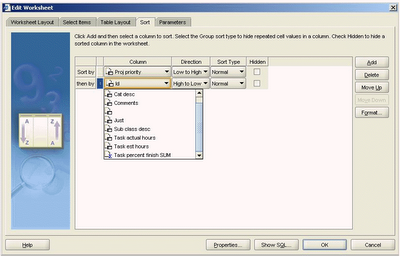
However, in the following screenshot, taken following the upgrade to JRE 1.5, you can clearly see that the current value is grayed out.

To disable the automatic upgrade of the Sun JRE, use this workflow:

  1. From the Windows Start menu, select Settings > Control Panel.
  2. Double-click the icon for the Java ™ Control Page. It is usually named either Java or Java Plug-in.
  3. When the Java Control Panel opens, click the Update tab.
  4. Uncheck the box labeled "Check for updates automatically".
  5. Click OK to save and exit.

Note: if your system has already upgraded to Sun JRE 1.5 or above you will need to remove the old Java and re-install the one.

To remove the Sun JRE 1.5 and re-install the correct version, use this workflow:

  1. From the Windows Start menu, select Settings > Control Panel.
  2. Double-click Add or Remove Programs.
  3. Locate and remove the Java runtime environment.
  4. Depending upon which version your Application Server is using, download the Sun JRE 1.4.2_04 or 1.4.2_06 software from the Sun website. They can be found here:
    http://java.sun.com/products/archive/j2se/1.4.2_04/index.html
    http://java.sun.com/products/archive/j2se/1.4.2_06/index.html
  5. On this page, look for and click on the Download J2RE link.
  6. On the next page, you are required to read and accept the license agreement.
  7. After checking the box labeled "Accept License Agreement", download the software labeled "Windows Offline Installation, Multi-Language". This file is about 15Mb in size.
    Either you or one of your IT staff should now connect to your machine as a local administrator and install the software. The Application Server will recognize that the software has already been installed and will not try to install it again, thus allowing Plus to run.

The file that is downloaded is an executable, and is called either: jr2e-1_4_2_04-windows-i586-p.exe or 1_4_2_06-windows-i586-p.exe

Monday, June 26, 2006

NULL format display when upgrading to 10.1.2

It seems that when you upgrade from a previous version of Discoverer to 10.1.2 that the existing default setting for null values has changed from blank to the word NULL. This is annoying because it means that the default display for null values in 10.1.2 is not the same as it was in previous releases. What this means is that old workbooks that contain null values will now display the word NULL instead of blank. One of my customers reported this to Oracle as a service request and received the following reply:

You will need to open each and every workbook, make the change and resave. There is no global setting to apply for previously created and saved workbooks unfortunately.Hope the above information was informative. If this answers your question kindly close the TAR else feel free to update the TAR.

My customer has 100s of workbooks and it will take some time to go through this. I pity the person who has 1000s of workbooks because they will have to do this for each and every one! Don't be fooled into thinking that what you set in pref.txt will help because it won't. The upgrade is done using Discoverer Administrator which does not even know of the existence of pref.txt so it will ignore whatever you have set and will use its own default which is NULL.

If anyone knows of a workaround please let me know. Otherwise, if you have encountered this issue yourself please share your experience.

Wednesday, June 21, 2006

Best Presentation - ODTUG 2005

This week I have been at the ODTUG (link)Kaleidoscope 2006 conference at the Wardman Park hotel in Washington DC, and what a nice hotel it is. The reason I am here was to take part in the business intelligence summit that was organized by Oracle. My paper, The art of using calculations in Discoverer had been accepted by the ODTUG conference as one of the papers that would be included within the BI Summit (list of papers in summit). I presented my paper on Monday afternoon, the first afternoon of the conference, to a very attentive and receptive audience.

You can imagine my surprise when I arrived last Sunday to find that last year's paper, A first look at Discoverer 10g Release 2, had been nominated as one of the top 10 papers for the 2005 conference. Actually, the authors of the top 10 papers read like a who's who of the cream of Oracle presenters: Mike Ault (link), Bradley Brown (2 papers) (link), Don Burleson (2 papers) (link), Tony Catalano, Paul Dorsey (2 papers) and Steve Feuerstein (link). Then there was me.

Tuesday lunchtime came and the excitement had been building because the previous day the committee had said that they would be announcing the winners of the two coveted speaker awards - Best Speaker and Best Presentation, during lunch. I am delighted to be able to tell you that yours truly won the award for the best presentation with my old friend Tony Catalano, from TUSC, winning the award for the best speaker. We were both shocked because seeing the power of the authors that were against us we were convinced that we were there only to make up the numbers. My award, which incidentally is a rather beautiful black plaque with gold lettering, reads as follows:

Oracle Development Tools User Group
Best Presentation Content and Topic
Michael Armstrong-Smith
Armstrong-Smith Consulting
A First View of Discoverer 10g Release 2
ODTUG 2005
New Orleans, Lousiana

On Wednesday I will be delivering an encore of the winning presentation, a copy of which can be found on the download page of our main website (link). Some photographs were taken and just as soon as I am able to get my hands on one or two I will post here. As you can tell, I am thrilled to bits. It still hasn't 100% sunk in.

I have to say though that I would not have won this award without the help of my dear wife Darlene. She not only contributed to the paper but was the co-presenter of the presentation with me in New Orleans. So even though there is room for only one name on the award, it really was a team effort and she deserves as much credit for this award as I do. Thanks sweetheart, without you I would not be where I am today.

Friday, June 02, 2006

Unable to save a workbook to the database

One of my clients recently had an issue with Discoverer 10.1.2 in that every time a user tried to save a workbook to the database they got the following error:

ORA-1483 INVALID LENGTH FOR DATE OR NUMBER

Upon further investigation it was noted that they were using 10.1.0.4 version of the database and that the database was installed onto a HP-UX(PA-RSIC) 64 bit server.

According to Oracle, there is a known bug, number 3668164, within the 10.1.0.4 database that will prevent Discoverer from being able to save to the database. SAVING A WORKBOOK USING DISCOVERER 10G GIVES - ORA-1483. I have to admit that I had not heard of this bug and so my interest was aroused. Upon further investigation it turns out that the operating system is a red herring and that this issue can arise on any operating system.

The solution is to patch the database to 10.1.0.5 or higher. Apparently there is a one-off patch for 3668164 but not if your database is running on a Windows server. In this case you will have to apply the full 10.1.0.5 database upgrade. My recommendation though is to upgrade to 10.1.0.5 anyway as many other bugs were fixed in this release.

Postscript: my client informed me that after they upgraded their database that the issue went away.

Note: bug 3668164 is not available for public viewing. This is most frustrating because Oracle have lots of cross references to it on MetaLink.

Friday, May 19, 2006

MetaLink Logins change this weekend

Hi everyone
Further to my recent posting (link) on April 20, this coming weekend is the one when you will be required to change your login id for Oracle MetaLink (link). According to MetaLink:

Starting the weekend of May 19, all MetaLink users will be required to change their existing MetaLink account and use a valid email address as their user ID to replace their current MetaLink user name.
With these changes, you will be presented with a one-time conversion page that will display the email address that is currently in your MetaLink profile. You will be asked to confirm if this is your current email address that you wish to use as your new MetaLink user ID, your password will be reset, and you will be emailed a new password.
The second time you log into MetaLink, you will be required to use your email address and change your password. Customers with multiple MetaLink accounts or multiple email addresses will be taken through some additional steps to enable them to update all their accounts.


For more information, please refer to MetaLink notes 369689.1 and 361177.1

Friday, April 28, 2006

Memories of Collaborate - Part 1

Well Collaborate '06 has come and gone and I thought I would jot down some of the memories of the event as seen through my eyes. For me the event started on Sunday with an all-day Discoverer workshop. As I live in Cookeville, TN, which is only 80 miles from Nashville, there was no need for me to fly and I was able to avoid the crowds of Collaborators at the airport.

Saturday April 22, 2006
Because Sunday was scheduled to start at 8:30am I decided to drive down the night before. So following dinner, Darlene, Byron, our son, and me set off in two vehicles with all our equipment for the one and a half hour drive to Nashville. After an uneventful journey we went straight to Kinkos to collect our workshop manuals. As has become the norm with Kinkos these days, not all of the material had been printed and they asked us to come back in the morning for the rest. How can they consistently get our printing requests wrong beats me. Fortunately our hotel for the night, the Hampton Inn near to Opryland, was only a couple of miles away and we were able to be in our beds by about 10pm.

Sunday April 23, 2006
After what seemed like only half an hour, we received our 5:30am wake up calls. With less than three hours to go to the workshop there was no time for any dilly dallying. A quick breakfast, and it was quick because sausage in gravy is not my idea of food, was followed by the second trip to Kinkos and then the short drive to the Opryland hotel. If you have never been here, this is a must see hotel, one of the very best in the world in my opinion. Unlike some of the other attendees who were taken aback by the sheer size and beauty of the place, because I live in Tennessee this is a place that I now take for granted as we frequent it often. I also knew the nearest parking place to the conference center so at about 7:15am we were able to start unloading our equipment. This is where the day started to go pearshaped.

First of all, there are stairs going both up and down from the conference center entrance. Our allocated room for the day was on the upper floor, but guess where the elevator was? It was on the ground floor, down a flight of some 20 stairs. Was there an elevator down from the entrance to the ground floor? No, of course not. That would have been too much too ask. So having found one of the hotel trolleys we off loaded all of our equipment and wheeled it into the building. After off loading again to climb the stairs we then man-handled the trolley up the stairs before reloading it for the trip to our room. Anyway, we made it and by 8:30am we were all set up.

The morning of the workshop went well. Our attendees were able to connect to one of our two servers and we had a quite enjoyable couple of hours. Then, for some inexplicable reason, from about 11am the hotel decided to undertake maintenance on their really powerful wireless network. I had thought ahead and purchased a brand new Linksys wireless router but this was no match for whatever the hotel were using because every 20 minutes or so they would zap the airwaves and knock my little network into the next century. Of course I did not know this at the time as it was only the next morning that the hotel apologized. They apparantly had not understood that this was a hi-tech conference! Maybe Oracle isn't hi-tech after all. Maybe its only us who work with it who think it is. Makes you think though, doesn't it?

Despite the interruptions to the wireless network, we were able to complete the workshop and get through all of the material by hard wiring my laptop to the server. At about 4:30pm, Mark Rittman joined me for a short question and answer session. After this it was pack up and go home time for Darlene and Byron, while I went to my hotel for the night. No, I was not staying at Opryland. I know how much it costs. Instead I had a rather lovely two bedroomed suite in a timeshare complex about half a mile away. I'm not stupid.

That night, unaware of what the hotel had been doing with the wireless network, I got on the telephone to Linksys and started giving them stick about my new router. They tested it out and told me there was nothing wrong with it. Hmm, I thought, so what was wrong then? Sleep could not come quick enough.

Monday April 24, 2006
The next morning I had a lie in and then casually wandered over to the conference to check in. After collecting my materials I headed off to the speaker room to let them know about the previous day's fiasco. On the way I bumped into Faun de Henry and her husband outside the BI/DW SIG meeting. Faun and I go way back to the early days of the SIG when I was secretary. I had to give that up when the company that I was working for at the time decided that I could no longer go to conferences. I think its time for me to get back into the SIG. Also outside the SIG was a lady called Marcia Livingstone, someone that I had emailed with with last year when her company was a prospective client. Giving my apologies to everyone I was in a rush to get to the speaker room to find out if anyone had complained about the previous day.

When I arrived at the speaker room, before I could say anything I met Samantha Falkiss from the OAUG organizing committee. She told me she had heard what happened as the hotel had been doing maintenance and I wasn't the only person affected. So now the cat was out of the bag and I could call home and let Darlene know that it was nothing to do with anything that we had done. This news made us all feel a lot better I can tell you.

After that good news, and after checking in and picking up my speaker's badge I set off back towards the BI/DW SIG where I sat in for the last session. There it was that I met up with Mark Rittman for the second time (link). After a few pleasantries and the now obligatory "I know why my workshop network did not work" exchanges with some of the folks who had been in my workshop, I headed off to make my introductions to the conference bookstore.

As I was saying hello to Carolyn Thompson from the bookstore (link), who should be standing there but Lisa McClain, our publisher from McGraw-Hill. What a pleasant surprise that was and we had a really pleasant conversation. Then reminded me that I was due to be the guest speaker on the Oracle Press booth that evening during the opening session of the conference exhibitor hall. To be honest, I thought this was on Tuesday evening so it was fortunate that she reminded me. So at just after 6:00pm I arrived in the exhibit hall and made my way to the Oracle Press stand, conveniently situated in the middle of the hall alongside the main Oracle demonstration area. Phew, the next hour flew by as dozens of people stopped by to get hold of the free Oracle Press t-shirts that we were giving away. By 7:30pm I was tired and went back to my hotel.

Tuesday April 25, 2006
Today was my main presentation day as I was giving a live, two-hour demonstration about how to build a Discoverer End User Layer. I knew this would go well because no network was required! Anyway, like a good Boy Scout, I like to always be prepared and so I went to the speaker room to make sure my presentation was right and that all my accounts were set up on my database. While I was there, who should walk in but Don Burleson, his dear wife Janet, accompanied by John Garmany. If you have not seen it, Don and John and the co-authors of the Oracle Press book "Oracle Application Server 10g Administration Handbook".

As lunch was rapidly approaching, Don invited me to join him. What followed was a rather pleasant hour and a half under the vast dome of Opryland reminiscing about old times. You may not be aware of this but Janet runs an organization (link) that uses miniature horses instead of dogs to help visually impaired people. I had the good fortune to visit to their place in Kittrell, North Carolina, last year to give some Discoverer training. While I was there, I fell in love with the "minnies" as they are affectionaltely known and bought three. They now lead a happy life on my ranch in Tennessee. I had hoped to meet up again with Mike Ault, another of Don Burleson's army of experts, but alas it was not to be. Mike was giving a presentation and did not make it for lunch.

The early part of the afternoon was spent in the exhibitor hall, once again meeting up with lots of old faces and acquaintances. Right by the entrance was the big TUSC (The Ultimate Software Consultants) stand so I thought I would drop in and see who was there. Presenting at the time was what looked like a familar face with a new look, Tony Catalano. I say new look because Tony is now sporting a rather interesting looking goatee! Tony was project lead on a project that I did for TUSC in Kansas City a while back. Also there was Joe Trezzo and Matthew Kundrat. Joe is one of the owners of TUSC and he was responsible for setting up my first project. Matthew leads TUSC's training operation and he smilingly took me to one side to let me know that they had just lost a training deal to us. He was very generous and said that he did not mind missing out on a client to us. I told him the same thing applied the other way and that if a prospect of mine said that they were going to TUSC I would be ok.

My wanderings in the exhibit hall continued and I met up with my friends David Fuston, Maggie Tompkins and Kathleen McCasland on the ODTUG stand. I was reminded that I still have to submit my paper for the ODTUG Kaleidoscope (link) conference in June. I will do it, I promise! Actually, this looks like being a great conference. My paper, which is part of the Business Intelligence Summit, will be on making the most of calculations inside Discoverer.

Following this, I went and sat in on Dan Hotka's tips and tricks presentation on Discoverer. I'm so glad that a second Discoverer session made it to the conference and, as luck would have it, Dan's presentation was in the same room as mine and immediately prior. Good planning, good luck or whatever you call it, I got to relax for an hour.

Wednesday, April 19, 2006

Last accessed date for a workbook

I was recently asked if I knew of a way to get the last accessed date for a workbook. The company were looking to find out which workbooks had not been used recently. So I got to thinking and then it hit me. "So long as the company have not turned off Discoverer's statistical gathering mechanism, I can get this information by querying Discoverer's statistics table".

Here then is the SQL code that you will need. To run it you need to be logged into SQL*Plus as the owner of the EUL:

SELECT
QS.QS_DOC_OWNER USERNAME,
QS.QS_DOC_NAME WORKBOOK,
QS.QS_DOC_DETAILS WORKSHEET,
MAX(QS.QS_CREATED_DATE) LAST_USED
FROM
EUL5_QPP_STATS QS
GROUP BY
QS.QS_DOC_OWNER,
QS.QS_DOC_NAME,
QS.QS_DOC_DETAILS

Monday, April 17, 2006

April 2006 Oracle Discoverer Patch Levels

Oracle recently published a document on MetaLink that "explains the minimum and recommended Discoverer patch level Administrators and DBAs should apply for optimum stability, greatest feature availability and most efficient maintenance".

I will summarize the major releases here, along with their patch numbers.
  • Discoverer 3.x - completely desupported. The terminal release was 3.1.36 for Administrator and Desktop and 3.3.62 for Plus and Viewer. You should migrate to 10.1.2.0.2 as soon as you can. Note that there is no direct migration path from 3.1 to 10.1.2.0.2 as you must migrate via 4.1.48.08

  • Discoverer 4.x (stand-alone, not as part of E-Business Suite) - desupported from June 30, 2004 with Extended Support (ES) available until June 30, 2007. The terminal release was 4.1.48.08. You should migrate to 10.1.2.0.2 as soon as you can.

  • Discoverer 4.x (with E-Business Suite) - will be desupported from October 31, 2006. According to Oracle "since Discoverer 10g (10.1.2.0.2) is fully certified, we HIGHLY recommend implementing or migrating to this release". Extended Support (ES) will continue until October 31, 2009.

  • Discoverer 9i (9.0.2) - desupported from July 1, 2005 with Extended Support being available until July 1, 2008. The terminal release was 9.0.2.54.10. You are urged to upgrade to 10.1.2.0.2 as soon as you can.

  • Discoverer 10g (9.0.4) - There is no terminal release as of this time because 9.0.4 is still a supported product, although desupport (ECS) is scheduled for December 31, 2006. The recommended release is 9.0.4.45.07. Extended Support will continue until December 31, 2009.

  • Discoverer 10g (10.1.2.0.0) - The terminal release is 10.1.2.45.46c. You can upgrade to 10.1.2.48.18 by applying the 10.1.2.1 patchset which will bring you to the 10.1.2.0.2 code level. No ECS or ES dates have been announced for 10.1.2.0.0.

  • Discoverer 10g (10.1.2.0.2) - This is the current and most up-to-date release and the one you should be on if you can. Notwithstanding the fact that this is the current version it is also a brilliant piece of software. The current release is 10.1.2.48.18. No ECS or ES dates have been announced for 10.1.2.0.2.

Notes: the definitions of ECS and ES can be found on MetaLink in note 187553.1

Another BI blog of interest

You may be interested to know that Steven Chan has started a blog (link) dedicated to Oracle's E-Business Suite. In Stephen's own words he describes his site as follows: "An insider's take on technology stack-related topics for the Oracle E-Business Suite, with the occasional product announcement, glimpses into the inner workings of Oracle Development, editorials on business philosophy, and musings on IT industry news."

Of significant importance to the Discoverer world is the fact that Steven, who is the Director for Applications Technology Integration Oracle E-Business Suite Development, will be posting insider snippets from Oracle as they relate to both Discoverer and E-Business Suite.

One notable posting today (link) details the fact that Oracle plans to desupport Discoverer 4i by the end of October this year. This will have a significant impact on all of the Oracle Applications (E-Business Suite by another name) organizations that have been resistant to upgrade Discoverer to 10g. Now is the time to plan your upgrade. There is no reason for staying behind the eight ball any longer. Discoverer 10g R2 (10.1.2) is fully certified for Oracle Applications and, to quote from Steven's posting:

"The good news is that there really isn't any reason why you should hesitate to upgrade. Discoverer 10g is faster, more efficient, and has more analytic features for your end-users.

For example, Discoverer 4i's automatically-generated SQL statements tended to be very long, and would result in extremely heavy database queries, which in turn would return massive datasets, weighing down your application server. You probably already know this from reviewing your server logs, and from the number of helpdesk calls from annoyed users whose workbooks are taking hours to run.

The Discoverer 10g release has an automatic SQL trimming feature that intelligently removes unneeded columns. Depending on the workbook, this can result in significant improvements in the responsiveness of workbook queries, and lighten up your Discoverer and database server load, as well."

So there you have it, straight from the horse's mouth, so to speak. I urge you to not ignore this desupport notice and begin your upgrade plans. One of the key phrases that I like to use in training is "What starts right, stays right". If you wait until the last minute to plan your upgrade you will rush it and possibly get it wrong. Plan now while you still have five months of support.

Wednesday, April 12, 2006

Pref.txt - color combinations

Have you ever looked inside pref.txt at the settings for the Data, Heading and Totals colors? Have you wondered what color combinations you should use? If you are like me and you said yes, this posting is for you.

Here are the defaults that you will see inside pref.txt:

Data Format: foreground="0,0,0" background="255,255,255"
Heading Format: foreground="0,0,0" background="247,247,231"
Totals Format: foreground="0,0,0" background="247,247,231"

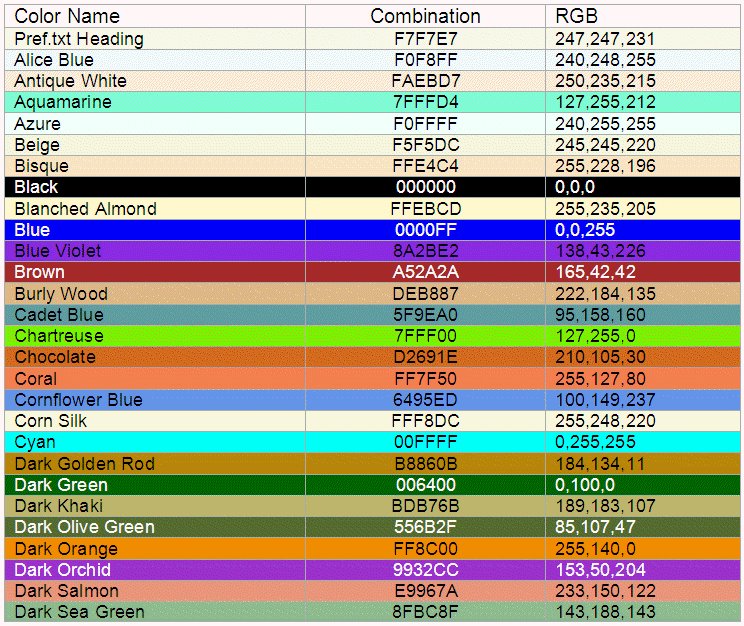
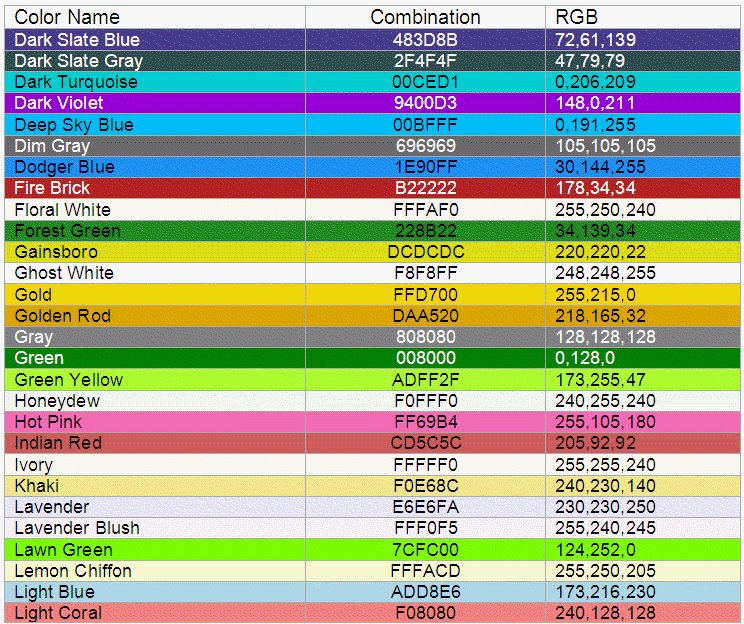
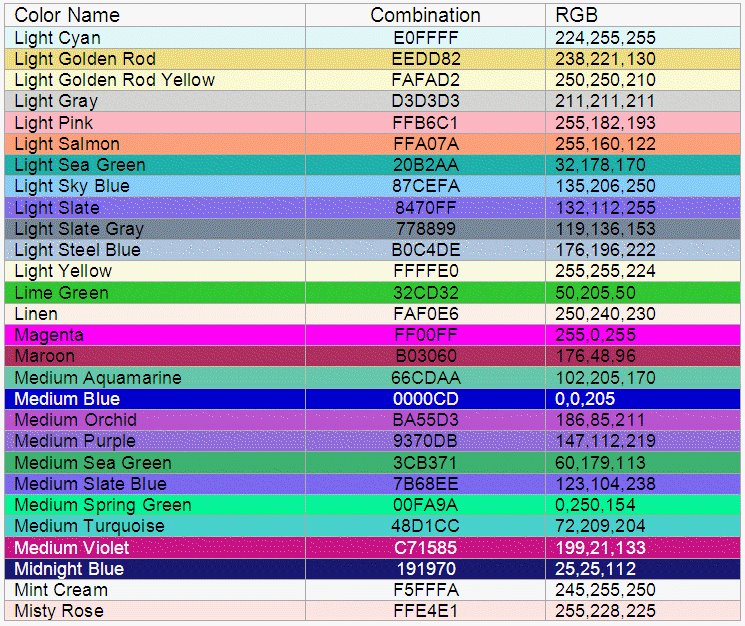
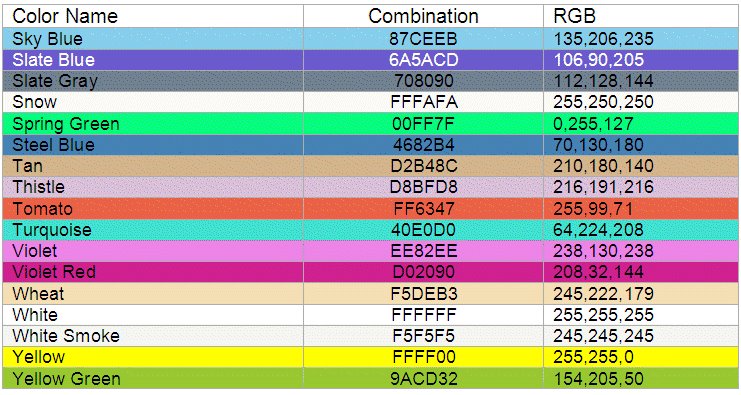
But what do these mean? Well, the three sets of numbers are the R-G-B (Red, Green, Blue) combinations. In the following illustrations you will find the most common used background color combinations. Most of these are displayed with a foreground color of black (0,0,0) but a few use white (255,255,255) as the foreground to show the contrast.

By the way, if you have also wondered about the colors that Discoverer uses to highlight areas of the screen, to work out the highlight color you subtract the R-G-B number from 255 and use that. So, for example, let's say your data color is Aquamarine, which is 127,255,212, the highlight color will be 128,0,43.

You will find pref.txt located at $ORACLE_HOME\Discoverer\util


Followers