Wednesday, April 30, 2008
BI Publisher and Discoverer - 1
I made lots of notes as I did the installation(s) and am now formulating a plan of action for publishing a series of articles that will describe in detail exactly how to go about taking a 10.1.2.2 Discoverer and making it interface with BI Pubisher.
Watch this space in the coming weeks.
Thursday, April 24, 2008
Performance degradation between IE and McAfee
Note: the above applies equally to Discoverer Viewer and Oracle Portal and probably many other Oracle tools
What appears to be happening is that McAfee is checking the data being returned from Discoverer before allowing it to be displayed on the screen. If you have McAfee and are using either IE6 or IE7 you may be complaining to your IT department about the slow running of Discoverer. This is not a Discoverer issue. We can prove this by running the same report in Firefox where it will run fast.
If you are observant, you can tell that something is amiss because the browser itself will indicate that it has finished processing (the green status bar at the bottom right will be removed or the Windows icon at the top right will stop wiggling around), yet the output still does not display and may not do so for 10 or more seconds.
As a background to all of this, IE uses a Windows component called Windows Scripting Host, or WSH for short, to execute JavaScript (and other things). My version of WSH was 5.6. The most recent version is 5.7, though Microsoft claim that there are no major changes in 5.7! However, one of the changes that they do mention is an improvement to JavaScript that should benefit pages with lots of AJAX-like features (like our Discoverer and Portal pages).
Here is the link to download WSH 5.7:
http://www.microsoft.com/downloads/details.aspx?FamilyID=47809025-D896-482E-A0D6-524E7E844D81&displaylang=en
I installed WSH 5.7, and while this did help IE7 it had no impact on IE6. We therefore seem to have the the following four options:
- Do not use McAfee - probably not an option for many users if the corporate policy is to use McAfee
- Disable the ScriptScan feature of McAfee across the enterprise - there may well be some resistance to this from your IT department
- Do not use IE6 but use Firefox
- Upgrade to IE7 and upgrade to WSH 5.7
I guess there is a fifth option which would be to get McAfee to include an option whereby you could specifiy which domains you trust data to come from and therefore bypass the scanning process.
Options 1, 3 and 4 are relatively simple to do although not simple to apply enterprise wide. I will therefore now concentrate on option 2 and show you how to disable the ScriptScan feature inside McAfee.
- First of all, right-click on the McAfee icon in the taskbar. You will see the following pop-up

- From the pop-up, select On-Access Scan Properties. The following dialog box will be displayed.

- Click on the ScriptScan tab
- Uncheck the box called Enable ScriptScan
- Click the Apply or OK buttons
I found that disabling ScriptScan usually takes effect immediately and you can even stay within the browser. You should see an immediate improvement in Discoverer performance.
When I tried re-enabling ScriptScan, to prove that McAfee was indeed the culprit, we noticed that we had to close the browser, and therefore the Discoverer session, before scanning was implemented again.
I found another interesting article on Andy Dominey's Blog concering this issue. You may want to take a look (link)
Note: as previously mentioned, the above applies equally to Discoverer Viewer and Oracle Portal and probably many other Oracle tools
If you have a solution for this or know of another workaround please let me know (email)
Useful patch numbers and release notes for 10g and 11g
This posting is a synopsis of the most useful patch numbers, certification notes and release information for Discoverer 10g Releases 2 and 3, plus the latest Discoverer 11g. At the bottom of the page you will find information concerning Discoverer certification with E-Business Suite.
Oracle have no plans to certify any version of 10.1.2 with IE8. The first version of Discoverer that will be certified with IE8 is the 1st patchset for Discoverer 11g which you should expect to see during 2010. For more information regarding IE8 certification please refer to MetaLink note 843865.1
As for Microsoft IE6 and 7 certifications, 10.1.2.2 is certified for use only with IE6, while 10.1.2.3 is certified for use with both IE6 and IE7.
Install Discoverer Administrator or Desktop onto Vista
In order to install the base Discoverer 10.1.2.0.2 tools for Administrator and / or Desktop onto Microsoft Vista you need to launch the setup.exe from a different location.
- 6153263 - this is the patch containing a modified installer that will allow the Discoverer 10g tools (Administrator or Desktop) to install onto Vista. Click here for more information.
This is a must-have upgrade and is the only version of Discoverer which is currently having cumulative patches released for it. This is a very stable release and will be the basis for all future releases. If you have already upgraded to 10.1.2.2 then you can apply 10.1.2.3 directly on top. There is no need to de-install 10.1.2.2 or any of its cumulative patches as 10.1.2.3 will manage all of this for you.
If you have not already applied 10.1.2.2 then the upgrade to 10.1.2.3 is a major upgrade and I advise your DBA and / or your administrator to carefully read the release notes before startng the upgrade.
10.1.2.3 vital note: If you have installed this patch make sure you also install CP2 (see below)
- 5983622 - this is the patch to upgrade Discoverer 10g to 10.1.2.3. It can be applied on top of any 10g version (e.g. - 10.1.2.0.0, 10.1.2.0.2/10.1.2.1 or 10.1.2.2)
After you have upgraded to 10.1.2.3, your Discoverer version will be 10.1.2.55.26
Cumulative Patches for Discoverer 11g
Oracle has released no cumulative patches for Discoverer 11g as of February 8, 2010. I expect to see these commence during the first half of 2010.
Cumulative Patches for Discoverer 10.1.2.3 (see platform notes and tags alongside individual patches)
Cumulative patches for 10.1.2.3 can only be applied on top of the base 10.1.2.3 and on top of each other. They will automatically de-install any previous cumulative patch before installing. Most cumulative patches are platform specific and usually require a password from support before you can download them.
- CP8 - 9694503 - issues 5-OCT-2010 - works with platforms 1, 2, 3, 5 and 8
- CP7 - 9112482 - issued 4-JUN-2010 - works with platforms 1, 2, 6 and 8
- CP6 - 8746296 - issued 18-NOV-2009 - works with platforms 1, 2, 3, 4 and 6
- CP5 - 8354043 - issued 12-AUG-2009 - works with platforms 1, 2 and 4
- CP4 - 7595032 - issued 28-APR-2009 - works with platforms 1, 2, 3, 4 and 6 (see note below)
- CP3 - 7319096 - issued 4-JAN-2009 - works with platforms 1, 2, 6 and 7 (do not install - read why)
- CP2 - 7198716 - issued 3-OCT-2008 - works with platforms 1, 2, 3, 4, 6 and 7
- CP1 - 7111842 - issued 7-AUG-2008 - works with platforms 1, 2, 3, 4, 6 and 7
The above cumulative patches can be applied to the following platforms:
- Microsoft Windows (32-bit)
- Linux x86
- IBM AIX (5L) Based Systems (64-bit)
- Sun Solaris SPARC 32-bit, can also be installed on Sun SPARC 64-bit
- Sun Solaris x86
- HP-UX PA-RISC (32-bit)
- HP-UX Itanium
- Oracle Solaris on SPARC 64-bit
Please apply the JDBC patch p4398431_10105_GENERIC.zip for bug 4398431(release 10.1.0.5).This patch needs to be applied to all Oracle Homes, i.e. Infrastructure home as well as all related midtier homes.
Bug 4398431 - HANG WHEN RETRIEVING A CONNECTION FROM THE IMPLICIT CONNECTION CACHE
Then proceed with applying the CP4 or above patch. If you are upgrading from CP4 and above it is assumed that you have already applied 4398431 and you do not need to do it again.
Database 10.1.0.5 upgrade notes
When you install the full-blown application server 10.1.2.0.2 (10.1.2.48.18) out of the box you will get a pre-seeded 10.1.0.4 metadata repository. Before you can apply either the 10.1.2.2 or 10.1.2.3 upgrade this database must be upgraded to 10.1.0.5. This upgrade will take a competent DBA about half a day.
- 4505133 - this is the 10.1.0.5 database patch
If you want to be able to interface Discoverer 10g with BI Publisher you will need to apply a web services patch to your Discoverer middle tier.
- 7028146 This is an updated web services patch and is compatible with cumulative patch CP7 for 10.1.2.2 and later- see below (6778560).
- 6622352 This is an updated web services patch and is compatible with 10.1.2.2 cumulative patches CP4, CP5 and CP6.
- 5648158 This is the original web services patch and can be applied on top of 10.1.2.2 (you see how important 10.1.2.2 is) along with any cumulative patch up to and including CP4
The web services patch is not required for Discoverer 10.1.2.3 as this level of the application server has the necessary web services components built in.
Upgrade to 10.1.2.2
This is no longer a must-have upgrade and if you have already upgraded to this release you need to now upgrade to 10.1.2.3. If you have not yet upgraded to 10.1.2.2 you should not do so and should proceed straight to 10.1.2.3.
Like 10.1.2.3, this is a major upgrade which will require an upgrade to your infrastructure database (see note earlier in this posting). If you are not using an infrastructure the upgrade to 10.1.2.2 is very easy and should take a competent administrator no more than an hour. The upgrade with an infrastructure is more complex and will take from a few hours to the best part of a day, depending upon the complexity and configuration of your application server setup.
- 4960210 Patch to upgrade Discoverer to 10.1.2.2.
Cumulative patches can only be applied on top of 10.1.2.2 and on top of each other. They will automatically de-install any previous cumulative patch before installing. Most cumulative patches are platform specific and most, certainly the more recent patches, do not usually require a password from Oracle Support before you can download them.
- CP8 - 7306816 - issued 14-AUG-2008 - this is CP8 for platforms 2, 3, 4, 6, 7 and 8 (see * CP8 note below)
- CP8 - 7111816 - issued 18-JUL-2008 - works with platforms 1 and 5 (see * CP8 note below)
- CP7 - 6778560 - issued 11-MAY-2008 - works with platforms 1, 2, 3, 4, 6 and 7
- CP6 - 6669003 - issued 12-MAR-2008 - works with platforms 1 to 7
- CP5 - 6472361 - issued 21-DEC-2007 - works with platforms 1 to 7
- CP4 - 6357481 - issued 07-NOV-2007 - works with platforms 1, 2, 3, 6 and 7
- CP3 - 6155500 - issued 31-AUG-2007 - works with platforms 1 to 7
- CP2 - 6129303 - issued 22-JUL-2007 - works with platforms 1, 2, 4 and 6
- CP1 - 5943426 - issued 23-MAY-2007 - works with 1, 2 and 3 - obsolete - do not use
The above cumulative patches can be applied to the following platforms:
- Microsoft Windows (32-bit)
- Linux x86
- IBM AIX (5L) Based Systems (64-bit)
- Sun Solaris SPARC 32-bit, can also be installed on Sun SPARC 64-bit
- Sun Solaris x86
- HP-UX PA-RISC (32-bit)
- HP-UX Itanium
- Linux Itanium
You should use 7111816 if you are patching Windows, and 7306816 if using any of the other platforms.
CP8 is the last cumulative patch for 10.1.2.2
OPatch
Oracle recommends that you always make sure you have the most-recent version of OPatch installed before applying any patches. As of this posting the most-recent version of OPatch is 1.0.0.0.62. The following Oracle Support documents will help:
- 2617419 - installer for OPatch 1.0.0.0.58
- 6880880 - instructions and downloads for OPatch 1.0.0.0.62
- Release 10.1.0.0.0 - suitable for Oracle databases 9i and 10.1
- Release 10.2.0.0.0 - suitable for Oracle database 10.2
- Release 11.1.0.0.0 - suitable for Oracle database 11.1
- Release 11.2.0.0.0 - suitable for Oracle database 11.2
MS IE7 Certification
Out of the box, Discoverer 10.1.2.0.2, even with the base upgrade to 10.1.2.2, is not certified for use with Microsoft IE7. The main issue is that when you are hyper-drilling between worksheets the parameter values are not passed properly.
- 5673463 - this allows Discoverer to be fully certified with IE7
Discoverer and E-Business Suite Certification
This section contains details about Discoverer's certification with Oracle E-Business Suite
As of November 2008, Discoverer 10.1.2.2 and all of its cumulative patches are certified for use against E-Business Suite 11i and 12i. For more information please go to Oracle Support and look at note 313418.1
Discoverer 10.1.2.3 is only certified if you apply CP1 or higher. So long as you have applied at least CP1 then it is certified for use against both 11i and 12i. For more information please go to Oracle Support (formerly MetaLink) and look at note 373634.1.
Note: The base 10.1.2.3 is not certified with E-Business Suite
This page is offered as a public service. If anyone has any information regarding patches, trouble with patches, or certifications please let me know
Do not upgrade to Discoverer 10.1.2.3
I urge you not to stay on the non-updated base install of 10.1.2.3. You should apply CP2 or CP1 as soon as you can (link to patches)
I have recently been contacted by someone asking for help with Discoverer 10.1.2.3 - 10.1.2.55.26. I'm guessing most of you never even knew that it had been released. There was certainly no big splash about this anywhere that I have seen.
Anyway, it was released 0n 07-MAR-2008 as part of Application Server 10g patch set 3, which you can find on MetaLink as patch number 5983622. This is a major patch and can be applied on top of 10.1.2.0.0, 10.1.2.0.2 or 10.1.2.2. However, when it was first released it was very buggy which is why both Oracle and myself were recommendingyou should not apply it at that time.
Happily, you are safe installing 10.1.2.3 so long as you apply at least CP1.
However, if you are using E-Business Suite, Oracle is still not recommending customers not to upgrade to Discoverer 10.1.2.3 because:
- 10.1.2.3 is not yet certified with E-Business Suite 11i or 12. This work is currently in progress and the appropriate notes will be updated when the certification is complete.
Therefore, if you have already upgraded to 10.1.2.3 you need to reverse that and get back to a stable version of 10.1.2. At that point, if you have not already done so, you need to upgrade to 10.1.2.2 (patch number 4960210) and then apply the latest 10.1.2 cumulative patch. As of the date of this posting this is CP8 which was released during July and August 2008. You can find it on MetaLink as patch number 7306816 (if on Linux, Solaris or HP) or 7111816 if you are using Windows.
Optionally, especially if you want to interface Discoverer 10g with BI Publisher you will need to also apply the web services patch which for CP4 and above is 6622352.
Monday, February 11, 2008
Need to login to Discoverer twice
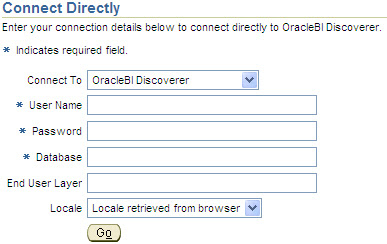
When you launch either Discoverer Viewer or Plus, as shown above, and enter your credentials into the dialog box, does Discoverer respond with something like this?Presumably what happens next is that you log in again using exactly the same credentials and now it works. Yes?
If so, the problem lies in the way that your server name has been defined inside the HTTPD.CONF file which you will find in the Apache configuration folder on your Application Server:
$ORACLE_HOME\Apache\Apache\Conf
You will need to edit HTTPD.CONF and search for a line that begins with ServerName. It will more than likely look something like this:
ServerName servername
For example:
ServerName asclaptop4
Notice how there is no domain name associated with the server. This is the problem, and is causing the system to incorrectly convert the URL inside OC4J.
Solution
There are two solutions; a temporary solution and a permanent solution. Both are outlined below:
Temporary Solution:
The temporary solution is to make sure that you only call Discoverer using a fully qualified domain name in the URL. You do that like this:
http://servername.domain.com:port/discoverer/viewer or
http://servername.domain.com:port/discoverer/plus
Permanent Solution:
The permanent solution is to change the ServerName so as to make it a fully qualified domain name, as shown in the example below, and then restart the application server. You now should be able to log in just once.
ServerName servername.domain.com
For example:
ServerName asclaptop4.learndiscoverer.com
By the way, using the command line, here is how to stop, start and check whether Discoverer is up and running:
To Start Discoverer, use this workflow:
- Navigate to the $ORACLE_HOME\opmn\bin folder
- Execute this command: opmnctl startall
To check whether Discoverer is up and running, use this workflow:
- Navigate to the $ORACLE_HOME\opmn\bin folder
- Execute this command: opmnctl status
- The system should respond with something like this:

Note: It is perfectly ok for DSA, LogLoaderd and dcm-daemon to have a status of Down so long as all of the other components show Alive.
To stop all of the Discoverer components, use this workflow:
- Navigate to the $ORACLE_HOME\opmn\bin folder
- Execute this command: opmnctl stopall
Do you have another solution for this issue? If so, either drop me a line or post a comment to this posting.
Wednesday, January 30, 2008
SunGard Summit 2008
Last year, we had over 500 people attend our booth. During the conference we also gave away an iPod and 4 copies of our Oracle Discoverer 10g Handbook (link).
For those of you who don't know, SunGard Higher Education (link) provides software, systems implementation and integration, strategic consulting, and technology management services to colleges and universities. Here at Armstrong-Smith Consulting we are delighted to have partnered with SunGard and to be a part of the SunGard Higher Education Collaborative.
Our partnership allows us to provide report building, training and other consultancy services for Oracle Discoverer on the SunGard ODS and EDW products. We can even help institutions comply with federal and state regulations to ensure that their private data is secured.
- Are you a SunGard Higher Education customer?
- Do you have the SunGard ODS or EDW?
- Do you have Oracle Discoverer?
Monday, January 28, 2008
Would you like to see your BI articles on the web?
To have documents posted you would need to send them to me, along with any commentary that you would like to see displayed. If you have enough material I could even create a special page just for you. I do however reserve the right to look through any documents you send me before publishing as I would not want anything that is offensive or a copy of someone elses work on my site. If I see anything that is of concern I would raise it with you and I will of course give you full credit for anything you send me that is published.
The first documents have already been submitted (link) and I would like to say thank you to Jayashree Satapathy and Krishna Mohan from Hyderabad, India for sending me two Discoverer Power Point presentations. The two papers that have been submitted are:
- Discoverer 10g Administration - 84 slides that focus on administering Discoverer in an E-Business Suite environment. You don't see many papers on this topic and you may well find something you didn't already know
- Discoverer 10g Desktop - 80 slides that focus on the Discoverer Desktop, a tool that does not get a lot of press these days. Towards the end of this paper you will find some very interesting slides that walk you through running a Discoverer worksheet from within E-Business Suite
New white paper on Discoverer sizing
I have therefore decided to publish my findings as recommendations in a white paper. That white paper is now available for download (link) from my main web site.
If you have any experience with sizing of Discoverer that you would be willing to share please let me know. We can all better help the community at large if we share information.
Friday, December 07, 2007
Discoverer Cumulative Patches available
If you didn't know already, let me be the first to give you the great news that Oracle has changed its patching policy for Discoverer. Gone are the days of sifting through myriads of individual patch numbers trying to figure out if there is a patch for the issue you are seeing. Instead, Oracle has introduced what are called Cumulative Patches.
If you have access to MetaLink you should take a look at note 466058.1. Here are the main points (mostly Oracle's text with some explanatory comment from me):
After getting numerous suggestions from customers, partners, and internal support engineers, Oracle Discoverer Development has implemented a cumulative patching model starting with Oracle BI Discoverer 10g (10.1.2.2). This is Discoverer version 10.1.2.54.25. The new model replaces the one-off patching model that was in practice with previous versions 10.1.2.0.2 – 10.1.2.1 (Discoverer 10.1.2.48.18).
These Discoverer cumulative patches can be installed on top of the full Oracle Application Server or the Oracle BI Discover standalone editions 10.1.2.2 (Discoverer 10.1.2.54.25), and higher versions.
The cumulative patching model applies to Discoverer Plus and Viewer (in other words the middle-tier), for both Discoverer relational as well as Discoverer for OLAP. Patching for Discoverer Administration and Desktop on Windows (the client-server components) will continue to use the previous one-off patching model, at least for the time being.
Here is some additional information about the cumulative patching model:
- The Discoverer cumulative patch (otherwise called CP):
The Discoverer cumulative patches (CP) for Oracle BI Discover 10g (10.1.2.2) are what Oracle call merge patches. These combine multiple one-off bug fixes rolled up into a single patch. The good news is that these cumulative merge patches include bug fixes for both Discoverer Relational and Discoverer for OLAP. The excellent news is that each patch is cumulative, meaning, that CP7 will include all fixes up to and including CP6 plus any new bug fixes. - The Discoverer cumulative patch schedule:
Oracle plans to release the Discoverer cumulative patches approximately every five (5) weeks. According to Oracle, these dates are approximate and may change depending on the number of bugs encountered. In reality the average has been about 10 to 12 weeks. As of the time of the latest edit to this posting, Oracle has released 7 cumulative patches. The latest one is CP7 (patch number 6778560) and contains over 300 bug fixes on top of the base Discoverer 10.1.2.2 patchset. (link to useful patches) - The advantages of Discoverer cumulative patches:
Unlike the one-off patches, which are still availble by the way, each cumulative patch contains large number of bug fixes and undergoes Quality Assurance (QA) regression testing. Oracle state that this will greatly improve the stability of the patches and the product and will help customers take advantage of the latest available bug fixes. This also greatly reduces maintenance since you install only one cumulative patch and do not have to install and rollback multiple one-off patches
Friday, October 19, 2007
Open World is coming
When: Monday 12th November 11:00am to Noon
Who: Michael Armstrong-Smith
Where: Franciscan Room D, Hilton
What: Build a Discoverer EUL in one hour
Yours truly will be giving a a quick, fast, live (yes live) demonstration on how to build a Discoverer End User Layer
When: Monday 12th November 12:30pm to 1:30pm
Who: Steven Feuerstein, Quest Software
Where: Hilton Continental Ballroom 5
What:Break your addiction to SQL
Steven is one of the best speakers on the Oracle circuit and has written many books on SQL (link). If you have never heard him before you should drop in. He also runs a cool blog (link)
When: Monday 12th November 3:15pm to 4:15pm
Who: Steven Feuerstein, Quest Software
Where: Hilton Yosemite Room B
What: Optimize PL/SQL with Collections
When: Tuesday 13th November 10:45am to 11:45am
Who: Mike Durran, Oracle
Where: Moscone West 3022 L3
What: What's coming next for BI Standard Edition and Discoverer
Along with Jeff Hohman and Mike Donahue (see below), Mike Durran is among my favorite presenters. Even if you don't like the subject, which you should seeing as you are reading this blog, drop in anyway because all of them are nice people. You'll always get straight answers from these gentlemen.
When: Tuesday 13th November 12:15pm to 1:15pm
Who: Mike Durran, Oracle
Where: Moscone West 3022 L3
What: How to migrate Discoverer to BI Enterprise Edition
When: Tuesday 13th November 3:15pm to 4:15pm
Who: Steven Chan, Oracle
Where: Moscone West 3022 L3
What: Using E-Business Suite with Application Server 10g
Steven runs a great blog (link) for everything to do with E-Business Suite. If you use it you could do a lot worse than drop in and take a look.
When: Tuesday 13th November 4:30pm to 5:30pm -
Who: Michael Armstrong-Smith
Where: Moscone West 2nd Floor Lobby
What: Oracle Press Author Meet and Greet
If you have a copy of my Discoverer 10g Handbook bring it along and I will sign it for you. If you don't have one yet, get one at the bookstore - you know you want one!
When: Wednesday 14th November 3:00pm to 4:oopm
Who: Simon Griffiths, British Telecom
Where: Moscone South 303
What: Partitioning experiences
When: Thursday 15th November 8:30am to 9:30am
Who: Jeff Hohman, Oracle
Where: Moscone West 3024 L3
What: Discoverer, Portal and VPD
Where: Thursday 15th November 10:00am to 11:00am
Who: Mike Donahue, Oracle
Where: Moscone West 3014 L3
What: BI Publisher with E-Business Suite
When: Thursday 15th November 11:30am to 12:30pm
Who: Mike Durran, Oracle
Where: Moscone West 3014 L3
What: Oracle BI Standard Edition Best Practices
When: Thursday 15th November 2:30pm to 3:30pm
Who: Debbie Arnold
Where: Moscone West 3024 L3
What: BI Publisher made easy
Wednesday, August 22, 2007
An EUL horror story
Just over a year ago I consulted to a large organization and created a new EUL with a couple of business areas. It took three weeks to complete. On the Friday when I was leaving I migrated the whole lot from Dev to Prod and left.
About 11am on Monday morning I received a call that went something like this: Michael, hello, how are you? Ummm - Discoverer deleted itself from production. Don't you find that odd? Why does it do that?
Well you can't kid a kidder. Because I know the tool so well I said - it cannot just delete itself - either the owner or someone who knows the EUL owner's password must have logged in and told Discoverer to delete the EUL.
No admissions of guilt were offered - naturally. I mean - would you own up to having deleted your company's production reporting system on the same day that it went live? Perhaps booking a one-way ticket to Australia (sorry oz - but I am English) would be in order.
No problem - I said - go to your Prod backup and restore your EUL schema. You'll soon be back up and running.
Ah - they said - here's the second problem - we forgot to put the EUL schema into the backup routine.
Hmm - I said - in that case all you have to do is go to your Dev instance, export the EUL and then import it into Prod.
Ah - they said - here's the third problem - we refreshed Dev from Prod on Sunday afternoon and it also does not contain an EUL.
Oops - I said - when do you want me to come back?
Let us think about it - they said - and we'll call you back.
They did call me back and I informed them that before I left on Friday I had taken a backup myself of the EUL in Dev and told them where it was on their server.
Phew - they said - thank you, thank you. Oh and by the way the DBA admitted to having dropped the EUL schema on Friday evening as he thought it was a user messing about!
I recount this story as a warning to everyone else - please make sure your EUL schema is included in your backups. A good administrator should also take periodic exports of the EUL - just in case!
Anyone else got a similar horror story - hopefully with a happy ending?
By the way - I'm in Boston this week and I can't find a decent English cup of tea anywhere. In years gone by we would have gone to war over that. Oh - we did - and we lost. Methinks I'd better keep a low profile.
Monday, August 20, 2007
Paper accepted at Open World 2007
Either way, this will be a live demonstration, using the Discoverer 10.1.2 Administration tool of how to create a fully working End User Layer inside one hour. You will be shown all of the steps involved in creating a fully working Oracle Discoverer EUL. If you have a copy of the Oracle Discoverer 10g Handbook, this presentation will take you through all of the steps required to build the tutorial database.
I will start by selecting the schema owner and tables required. Using the Load Wizard, you will be walked through all of the steps involved in loading the meta data definitions from the source database. Sticking close to the wizard's defaults, you will see how Discoverer automatically builds joins and lists of values.
After I have the base folders loaded, now the fun stuff begins. You will now be shown how to add some new items, in particular we will add new columns for calculating standard margin and mark up, as well as for profit and profit percentage. We do this so that the end users do not need to build these for themselves.
Next, you will be shown how to build complex folders out of the simple folders that we have just created. We will create fiscal date folders, linking these back to the sales order folder. After creating these new folders, you will be shown how to create fiscal date hierarchies so that users can drill from day, to fiscal month, fiscal quarter and so on.
After you have been shown how to build complex data folders, you will be shown how to build a geographic rollup. This rollup will allow the users to drill from City to District to Region.
After building the complex folders for fiscal date and geography, we will have created a psudo star schema with the our sales folder at the center.
The presentation will conclude with a walk through of some of the most often used features of Discoverer's Administrator edition. As I have said many times, you are only limited by your own imagination when it comes to working with Discoverer.
If you're going to be in San Francisco in November come and join me and say hello.
Wednesday, July 25, 2007
Using ALL in a parameter
Here's an example drawn from my own database.
As you can see I am starting out with a Crosstab workbook that displays the Cost and Selling Price for my Products by Channel and Product Line, with the Product Line being a page item.
Next, I started out by creating a new parametized condition. As usual, from the Values drop-down list I selected New Parameter. Below is my completed New Parameter dialog box. Of note you should see that I have told the user that they can enter ALL for all values, and I have even set the default to be ALL. Even though that value does not appear in my list of values, it doesn't matter. Discoverer will allow me to continue.
After clicking the OK button to close the New Parameter dialog box, back in the New Condition box I clicked the Advanced button to the side of the condition and from the enhanced list I selected OR so that I can add some Boolean logic to my condition.The first thing I did was to click the drop-down alongside the Item. From the list I then selected New Calculation. In the calculation I typed in the following: UPPER(:ProdLine). I did this so that my users do not have to type ALL (in uppercase) but rather they can type all if they wish, or even All.
Finally, as you can see below, I completed my condition my typing in ALL into the Values area.

My final condition is therefore this:
Line Name = :ProdLine
OR
=UPPER(:ProdLine) = 'ALL'
Notice how Discoverer added the = character in front of my calculation. This is Discoverer's way of letting you know that what follows is to interpreted as a calculation and not a literal value.
That's all there is to it. With the condition finished, whenever my users are prompted to select one or more product lines, they can type in ALL and Discoverer will return all values.
Monday, June 25, 2007
Memories of ODTUG 2007
I particularly enjoyed Mark rittman's paper on BI EE for Discoverer users, Jeff Hofman's paper on integrating Discoverer with SSO and Portal, and Mike Donahue's paper on BI Publisher. One paper that I had to miss, because it was being given at the same time as I was presenting, was by Mike Durran who was presenting Oracle's roadmap for Discoverer. Mike himself had published Oracle's Discoverer Statement of Direction on OTN (link). If you haven't had a chance to take a look, I fully recommend doing so as it clearly spells out that Discoverer is here to stay.
All in all, I counted almost 10 papers either directly focused on Discoverer on with Discoverer content. This makes a sharp increase over previous years and shows how popular Discoverer has and is becoming. If you or your company are sitting on the fence, already have Discoverer, but haven't made full use of it yet, then now is the time to do so. Discoverer is not going away and is firmly an integral piece of Oracle's business intelligence offerings.
By the way, my two papers from ODTUG will be available for download from by website (link) before the end of this week.
Monday, May 21, 2007
All about ODTUG

Why attend ODTUG Kaleidoscope? Because it's the only conference of its kind to give attendees the opportunity to get hands-on training with the tools, learn smart techniques, and talk with the experts that make Oracle tick. Kaleidoscope features:
- More than 125 Technical Sessions with handouts—real topics, with real information, for real developers. No hired presenters. No fancy footwork. Just genuine colleagues sharing practical information.
- Two full days of preconference Hands-on Training.
- Oracle product updates.
- A full-day Oracle Fusion Symposium.
- An Oracle PL/SQL Test-A-Thon, developed by Steven Feuerstein and packed with great prizes. The Test-A-Thon is sponsored by Quest Software and O’Reilly Books.
- A one-of-a-kind Install Fest, where you will learn from the "gurus" how to install and configure Linux to run Oracle 10g software.
- APEXposed, an ODTUG exclusive "Seriously Practical" training event on Application Express.
- Unprecedented opportunity for networking with colleagues and experts at organized functions, on-site SIG Meetings, and more.
For more information about ODTUG Kaleidoscope activities, location, exhibitors, or sessions, please visit http://www.odtugkaleidoscope.com/ or call 910-452-7444.
Hope to see you there.
My sessions at ODTUG
Securing Private Confidential Information is scheduled for Wednesday, June 20, 2007 from 4:00-5:00 in Coquina B
Automated Scheduling and E-mailing from Within Discoverer—and More is scheduled for Thursday, June 21, 2007 from 11:00-12:00 in Coquina G
Are you going to ODTUG? If so, look me up.
By the way, here's the low down on the two papers:
Automated Scheduling and E-mailing from Within Discoverer:
Ever wanted to know how to schedule a Discoverer workbook and automatically e-mail it? Perhaps you are one of the hundreds of people who have asked this very question on the OTN forums. If so, your search is over. You'll be amazed at the simplicity of the approach and be ready to take it back to your office and try it for yourself. You will also learn how to set up Discoverer lists of values that comprise both an ID and a Description at the same time. This live demonstration of both Discoverer Administrator and Plus will show you how to create parameters that will accept an ID or a Description, yet still return the description to the user.
Securing Private Confidential Information:
Recent high-profile cases have highlighted the need for data such as social security numbers, dates of birth, and ethnicity to be protected. Have you considered securing your private and confidential information but decided it was too difficult? Using profiles and a VPD, you will see how to set up both row-based and column-based security. Using Discoverer, you will learn how to set up a mechanism to allow your support staff to connect to the database using the same profile as an end user, without the need to know the end user's password. Thus, you can set up a secure environment yet at the same time enable your support staff to help your users without the security breach of a disclosed password.
Thoughts on OBI EE for Discoverer Users
if we’re looking at a potential upgrade for Discoverer users, it would be useful to take a moment to think about what’s good, and what’s not so good, about Oracle Discoverer
Mark does a very good job of discussing the pros and cons of Discoverer and at first glance the article can look a little anti-Discoverer. However, read on and you will see that Mark has been equally tough on the new OBI EE. Thus, in my opinion, I think the article is well worth reading.
Monday, April 23, 2007
Totals and blank lines
Example:
In the following worksheet, as shown in illustration 1, you can see that I have a group sort on the Customer with a sub-total on the Profit. A not uncommon scenario I hope you will agree.
Illustration 1: A group sort with the sub-total displayed correctlyNext, I right-clicked in the Customer and from the pop-up menu selected Format Table. Discoverer opened up the Format Data dialog box. This box has three tabs:
- Format - on this tab you set up the standard formatting characteristics such as font, size, background color, foreground color, alignment and so on
- Text - on this tab you can set additional characteristics such as uppercase, lowercase or capitalization
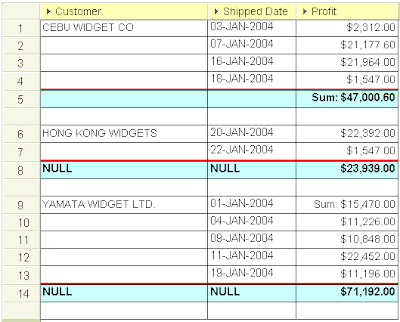
- Breaks - on this tab, which is only enabled if you are formatting a Group Sort, you can control what happens when group sorted items change. As you can see in illustration 2, I have enabled a line width of 2 in red, and the insertion of one blank row between each group sorted item.
Illustration 2: The Format Data dialog box and the Breaks tabAfter I clicked the OK button in the above box, Discoverer redrew my screen, but drew it incorrectly as shown below in illustration 3. As you can see, the totals still calculate correctly. But take a close look at what happened on the totals line for each sub-total other than the first one. As you can see, the word NULL has been inserted against each of the other items. In addition, take a very close look at row 9 and in particular at the cell value containing the Profit. As you will see, Discoverer has placed the Sum label here instead of alongside the $23,939.00 on the previous row.
It therefore appears that the insertion of an additional line for the group sort has caused the label to move down by that number of rows also. This means that Discoverer does not know what to do with the cell values on the original sub-total and so it inserted a NULL value. Formatting the table to change the display of NULL values to something other than NULL does indeed change the wording.
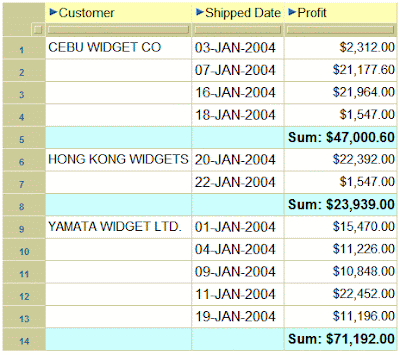
Illustration 3: A group sort with the sub-total displayed incorrectlyTherefore, please be very careful when using additional lines between group sorted items when there are sub-totals. The following illustration shows the same worksheet displayed in Viewer. As you can see below in illustration 4, Viewer does not appear to have this issue. I can therefore only assume it is something to do with the Java.
Illustration 4: The same group sort, as seen in Viewer, with the sub-total displayed correctly
Friday, April 13, 2007
The future for Discoverer
But why don't I believe this? Well for a start Oracle have new releases of Discoverer planned for this year (10.1.2.3), and next (11g). However, for fun, let's assume that Oracle do plan to drop Discoverer. They won't announce this in the same year that they release 11g because that would just make folks not even bother to use the latest version. So the earliest I would see such an announcement would have be in 2008. However, as all Oracle products carry a 5 year full support agreement from whenever the drop is announced this would mean that Discoverer would remain a fully supported, patchable, fixable product until at least 2013. That's a lifetime in terms of software. That's 6 years from now. Oracle will have bought SAP by then. Maybe even the San Francisco Giants will have managed to win a game against the Padres!
However, the real reason I don't believe Oracle will drop Discoverer is because of some very favorable comments coming out of Oracle.
Firstly, Oracle has recently revamped its Standard Edition page on oracle.com (link) which makes for very interesting reading.
Secondly, follow the link for the data sheet (link) and you will get to a PDF document that outlines just where Discoverer fits into the Fusion picture. With acknowledgements to Oracle, here are some interesting snippits from that document:
You've already chosen Oracle database for your business, now make it shine by complementing it with the business intelligence suite that is most tightly integrated with it - Oracle BI Standard Edition.
Oracle BI Discoverer is [tightly] integrated with other components of Oracle Fusion Middleware.
Discoverer reports are easily embedded within Oracle Portal using a simple wizard, making role-based dashboard creation a simple exercise.
Oracle Discoverer is also unique in that it recognizes and respects the Oracle E-Business Suite security model.
Today few of us buy best of breed kit parts and hand craft our own cars; most of us simply go to an established, proven manufacturer to obtain a complete solution, backed by a warranty with a single support organization should anything happen. Software should be like this - and this is where Oracle BI SE delivers. Everything - from ETL (with Oracle Warehouse Builder), to ad-hoc query (with Oracle BI Discoverer), to dashboards (with Oracle Portal), to pixel-perfect reporting (with Oracle XML Publisher), to custom BI development (with Oracle BI Beans) - is available as an integrated set of components.
The entire middleware solution can be effectively clustered with low cost hardware. Combine this deployment flexibility with an attractive pricing model for BI and middleware components, and you will be hard pressed to find a more affordable fit for your growing BI needs.
There - I could not have said it better. I think this clearly shows Oracle's intentions.